
Before you start
- The project is in Sightdeck and has a provider. If not, follow From scratch first.
- For red team runs: a running environment of the app, ideally a staging copy with test accounts and seed data.
- Already running scanners? Keep their SARIF files at hand; Import SARIF brings their findings in.
The AI does the reading and suggests: assets, threats, ratings. All of it waits in a review until a person accepts it. Nothing runs on its own, and a red team run is always started by someone.
Steps
The example is the Acme shop: a web shop with a customer database, a payment API and an admin panel.
- Discover the assets. Open Security. An empty project offers three ways to start: Import SARIF, Threat model with AI and Discover assets with AI. Start with the assets. The AI reads routes, configs and infrastructure files, and its suggestions wait under To review. Keep what is real, Drop what is wrong or not worth tracking. Packages from your lock files are not assets; they go into the SBOM. Details: Assets.
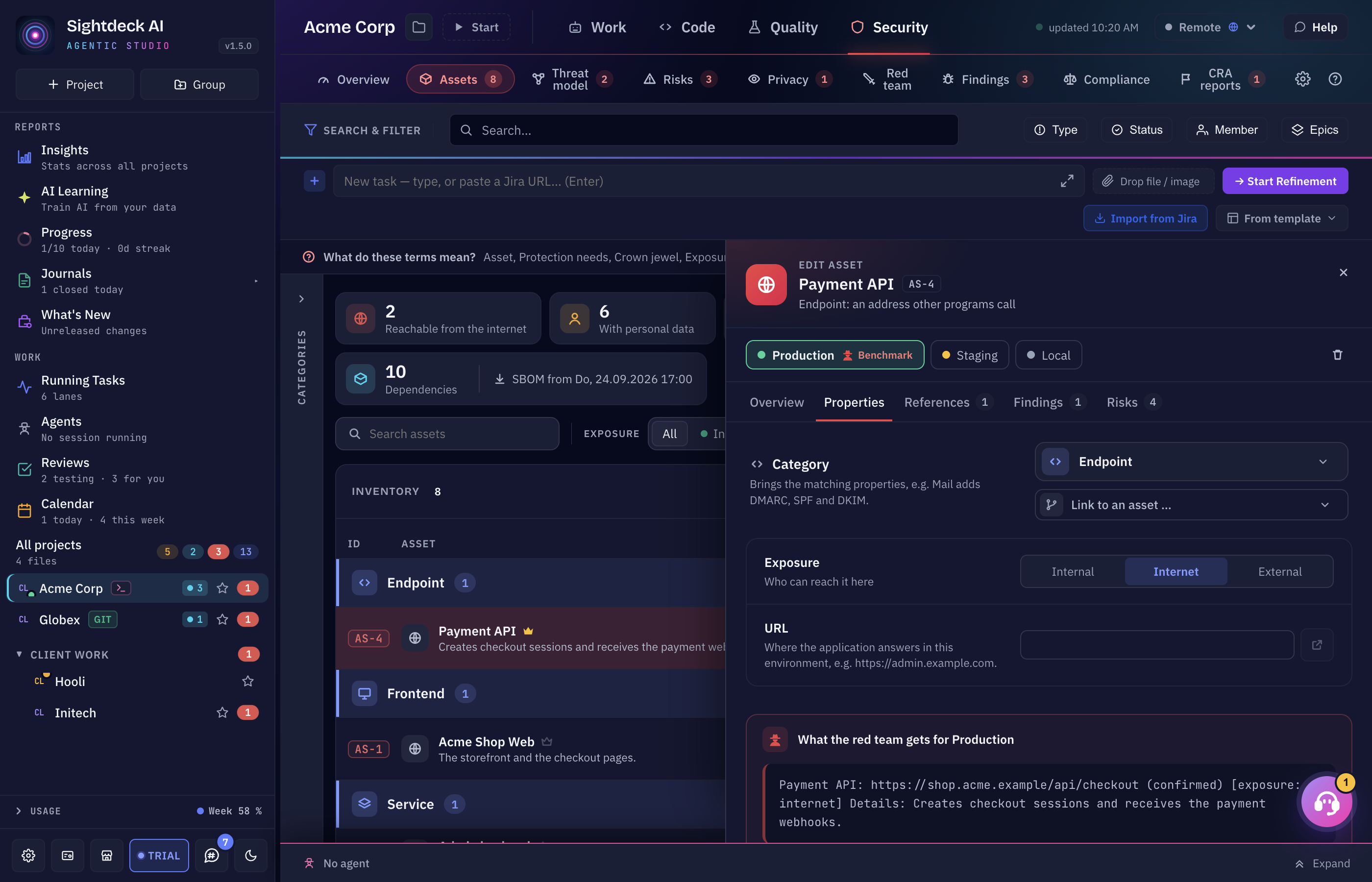
Step 1 and 2: the asset inventory with the crown jewels. - Mark the crown jewels. Click the crown next to the few assets whose loss would hurt most, for example
AS-2Customer database andAS-4Payment API. Open each one and fill in what matters: Exposure (Internet, Internal or External), the kinds of Data (Personal data, Payment card, Credentials), the protection needs for confidentiality, integrity and availability, and the Owner who answers for it. - Build a threat model. Click Threat model with AI, pick the crown jewels and check the scope folders. The AI follows the data from where an attacker gets in to these assets. It reads the code without changing it, draws the data flows and trust zones, and lists the threats, each with its STRIDE letter and a numbered pin in the diagram. The threats wait in a review box: Accept or Discard each one. Then set every threat to Open, Mitigated or Accepted. When code in the scope changes later, the model is marked out of date. Details: Threat models.
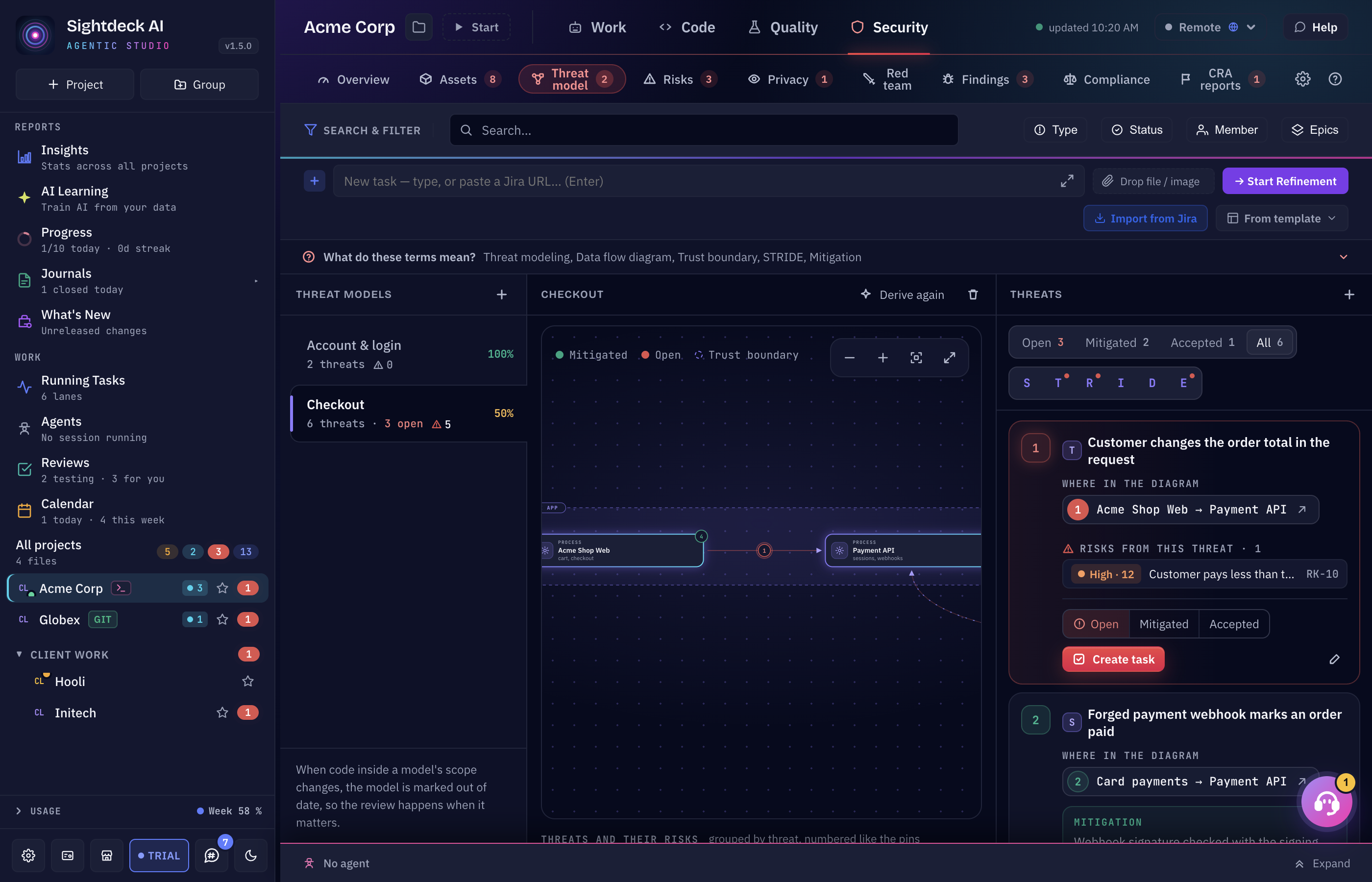
Step 3: data flows, trust zones and the threats on them. - Turn threats into rated risks. In Risks, click Derive from threat models. Sightdeck creates one risk for every open threat that has none yet; the impact comes from the protection needs of the asset, the likelihood waits for you. For each risk, answer three questions: how likely and how bad (1 to 5 each; Suggest ratings lets the AI propose), who keeps an eye on it, and what you do: Reduce, Accept (with a reason and an end date), Transfer or Avoid. Details: Risks.
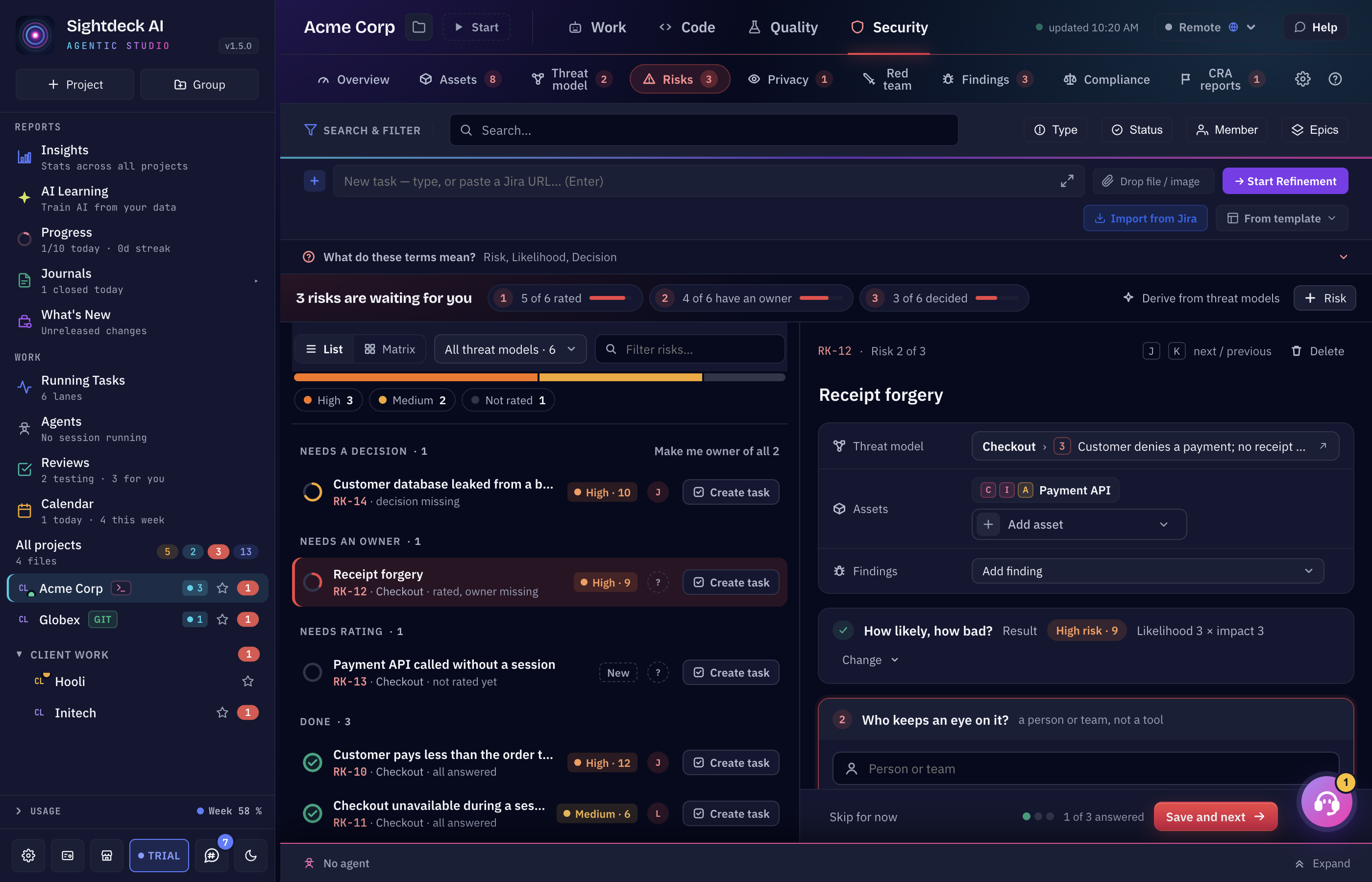
Step 4: every risk gets a rating, an owner and a decision. - Fix with agents. Create task sits on every open threat, risk and finding. The task goes onto the board with the context it needs, and an agent works on it like on any other task. A mitigation only counts once a task or a passing test case backs it, so add a regression test case in Quality for the fix. On the Overview, Next best step tells you where to start: worst risks first, and a group of findings with one shared cause before single ones.
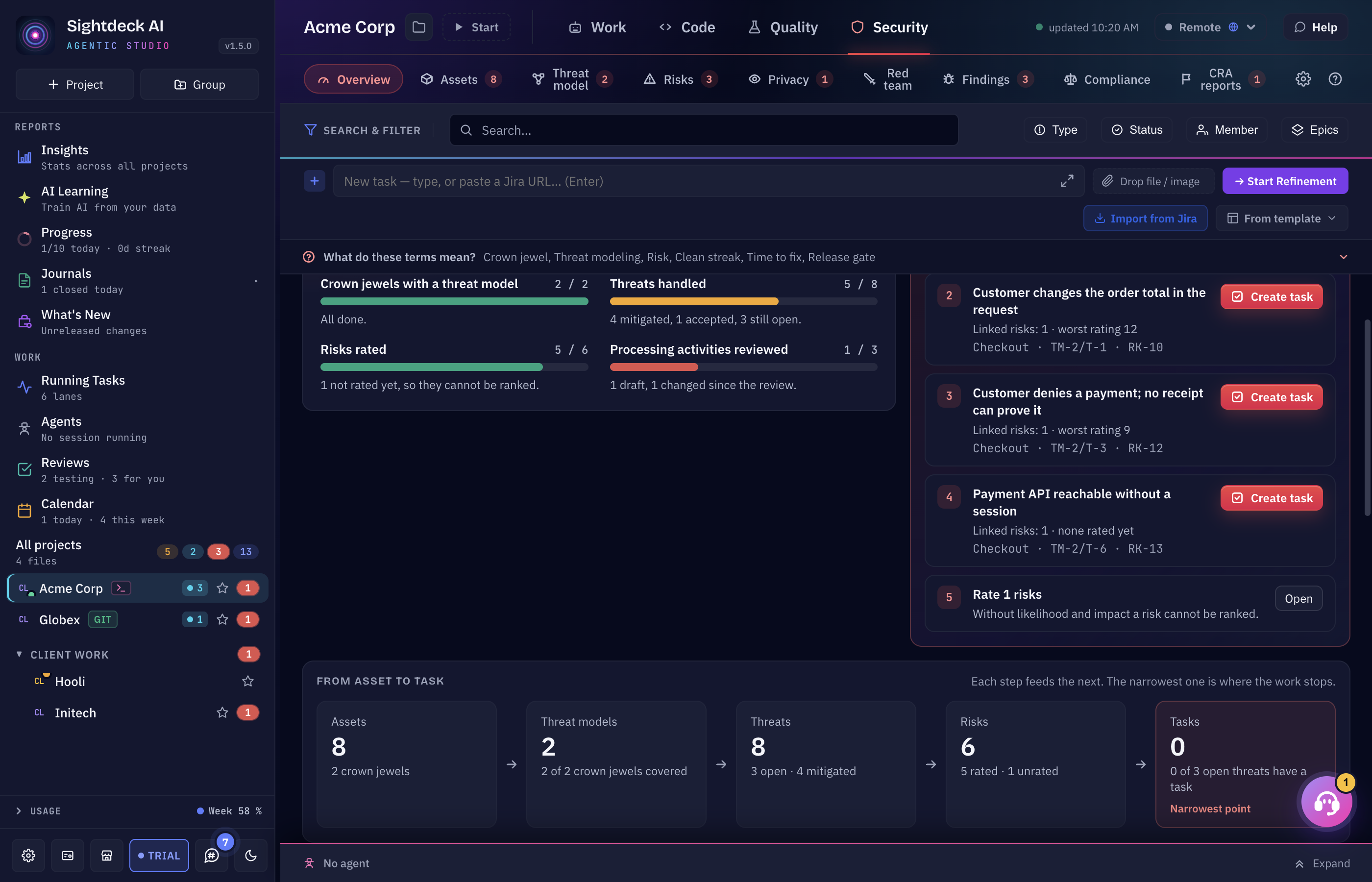
The Overview: verdict, next best steps, and the narrowest point in the chain from asset to task. - Start a red team run. Set up the environments in the Security settings and mark the one security is measured against as the Benchmark. In Red team, click New run, pick the environment and the lanes (Recon, Authentication and Injection are ticked by default; Access control and Configuration are available), and optionally a focus in plain words, for example the checkout and the admin area. Plan and start creates the run and its task and starts it. Every run keeps to the rules of engagement: only the named target, nothing destructive, at most 5 requests per second, test accounts only, and a reproducible proof for every hit. The result shows what was blocked, what got through, and what changed since the previous run. Details: Red team.
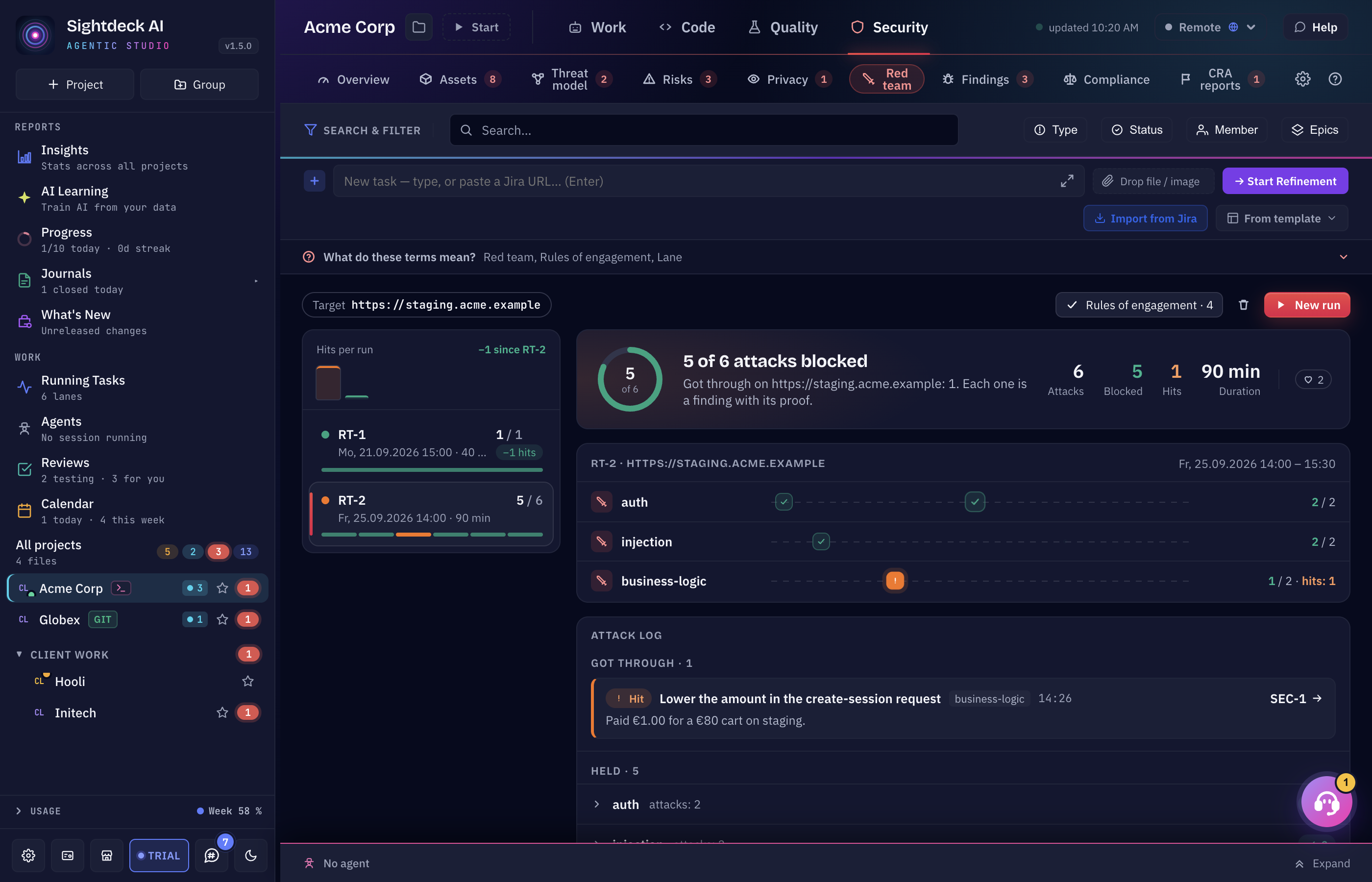
Step 6: a run's result, lane by lane, compared with the previous run. - Check compliance and the release gate. Compliance scores the EU Cyber Resilience Act, OWASP Top 10, ISO/IEC 27001 and GDPR Art. 32. Each control is judged from your data (findings, threat models, red team runs, assets, SBOM exports) or set by hand with a note. Export audit report saves the framework as Markdown. Under the CRA, CRA reports keeps the 24 h, 72 h and 14 day deadlines for an actively exploited vulnerability and drafts each message; you send them. Before a release, the Overview's Release gate must be green: no open critical finding, no high finding with a known exploit, an SBOM exported in the last 30 days, no leaked secret open, threat models up to date. Details: Compliance & CRA reports.
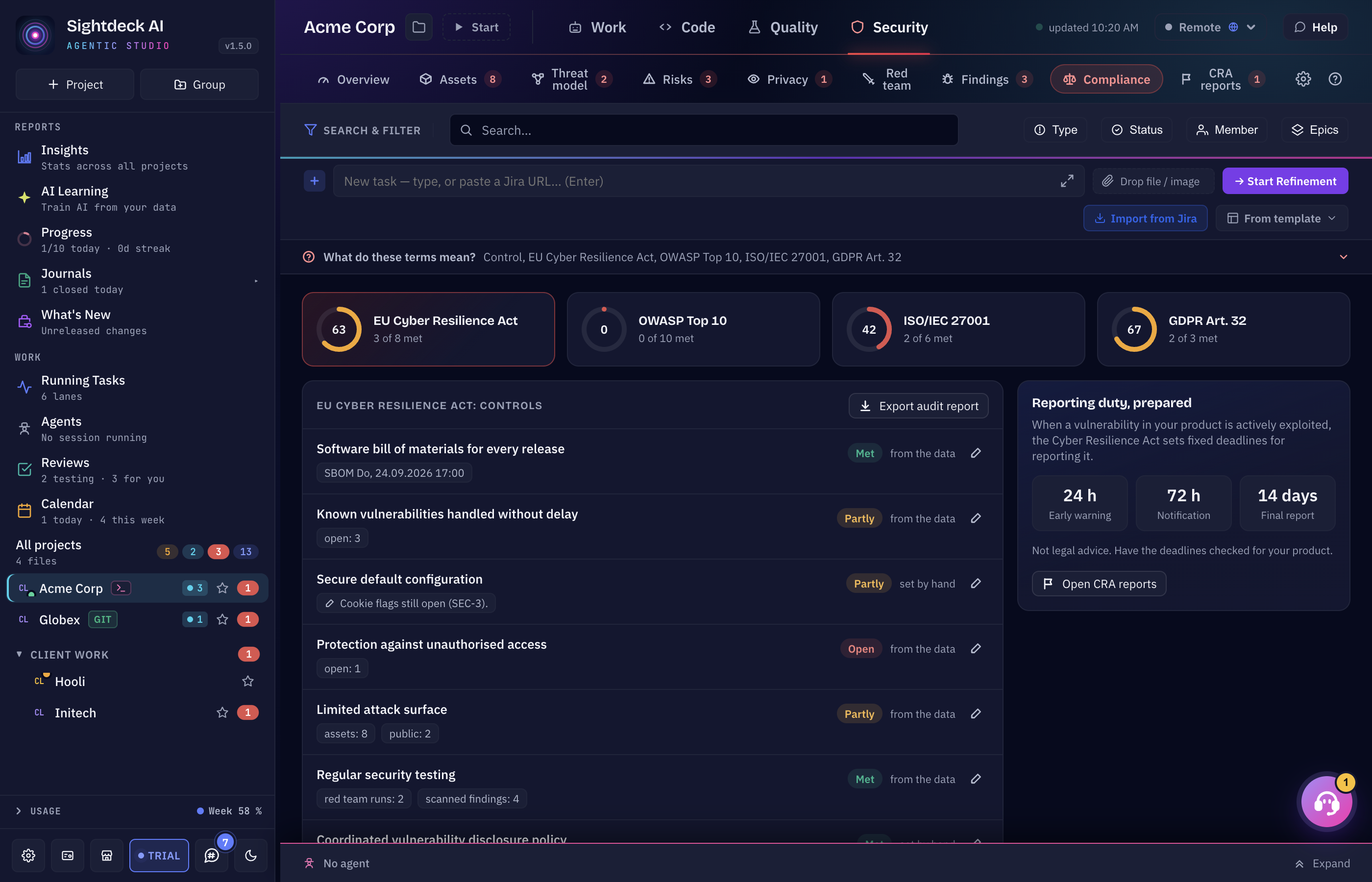
Step 7: controls judged from your data, ready for the audit report.
What you get
- An inventory of what is worth protecting, instead of a guess.
- Threat models drawn from the real code, kept up to date when the code changes.
- Risks with an owner and a decision, and fixes that run as tasks on the same board as the features.
- Evidence for audits and the CRA, collected while you work.
Good to know
- Work through the chain once. After that, follow what changed: out-of-date threat models, new findings, risks whose acceptance ran out.
- Without a license, a project holds up to 3 assets and 1 threat model, and red team runs are not available.
- Personal data on your assets feeds the records of processing activities in Privacy.
¿Te ha servido esta página?
Gracias — anotado.