
The idea
Agentic coding goes fast. What keeps it honest is a clear statement of what the product must do, and test cases that check exactly that. Sightdeck uses the artifacts defined by common testing standards, without forcing a process on you: requirement, risk, acceptance criteria, test conditions, test cases, test runs. Every link between them is kept, so you can trace from a requirement to its code task and to its last test result.
The AI helps at every step: it rewrites, suggests, drafts. A person decides. Nothing is approved and nothing is tested without someone looking at it.
Steps
The example runs through all steps: an online shop that charges shipping by parcel weight.
- Write the requirement and rate its risk. Open Quality, tab Requirements, and click New requirement. It gets an ID such as
R-021.- Title: Shipping cost by parcel weight. Description: The shop charges shipping by the parcel's weight. Review testability points out vague words and missing limits before anyone builds anything.
- Priority P1. Risk: Likelihood Medium, Impact High. Risk decides where testing effort goes first.
- Acceptance criteria: when does the requirement count as met? Write them with the product owner, or click Create with AI and keep the ones that fit. For example
AC-1Parcels up to 10 kg cost €4.99.
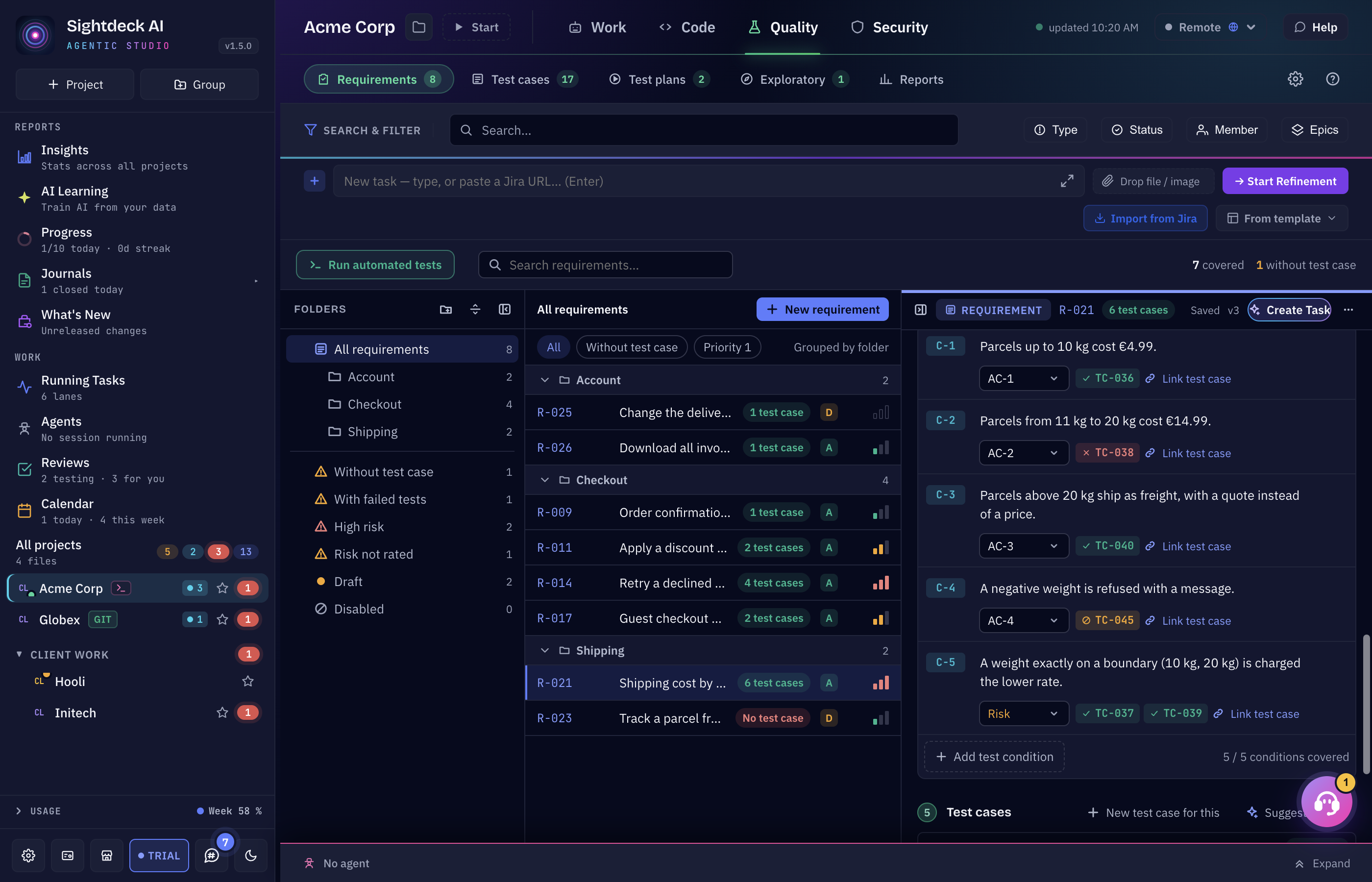
Step 1 to 3: the requirement with its risk, criteria, conditions and Create Task. - Derive the test conditions. Test conditions say what exactly is tested. For inputs with ranges, let a model do it: Open test design, pick Equivalence partitioning, and enter the ranges 0 to 10 (€4.99), 11 to 20 (€14.99) and 21 and up (freight), plus the result for every invalid value. With Boundary value analysis on, the number line shows 4 partitions and 9 boundary values. One click creates all 13 test conditions on the requirement. Decision tables and state transitions work the same way. Details: Test design.
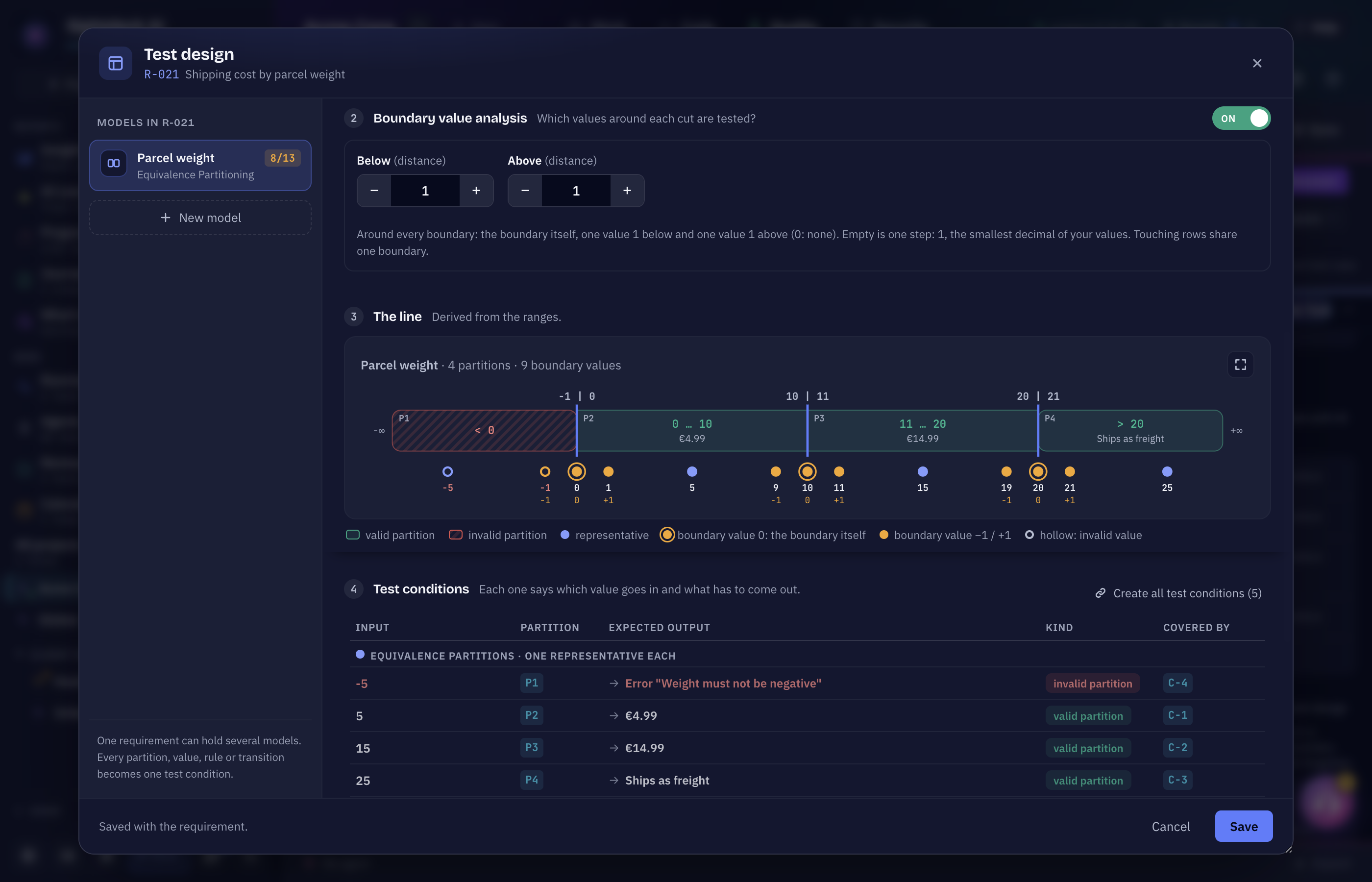
Step 2: one model, 13 test conditions. - Hand the build to an agent. Click Create Task in the requirement's header. A task goes into the backlog, and its concept carries the requirement's ID, version, risk, the acceptance criteria and the test conditions. Refinement decides whether the task builds the behaviour or verifies existing code against it, and splits it into an Epic when it is too big. Start it. Have several requirements? Create a task for each and start them together; see Run several tasks at once.
- Design the test cases in parallel. While the agent builds, you write the test cases. A test condition without one shows Create test case: the new test case already covers the requirement and that condition. Suggest with AI drafts test cases for the whole requirement at once. Every test case starts as Draft; Check quality points out unclear steps and missing expected results, and a person approves it. For example
TC-038Parcel of exactly 10 kg costs €4.99, with the steps Add a product that weighs 10 kg and Go to checkout, expected Shipping is €4.99. Details: Test cases.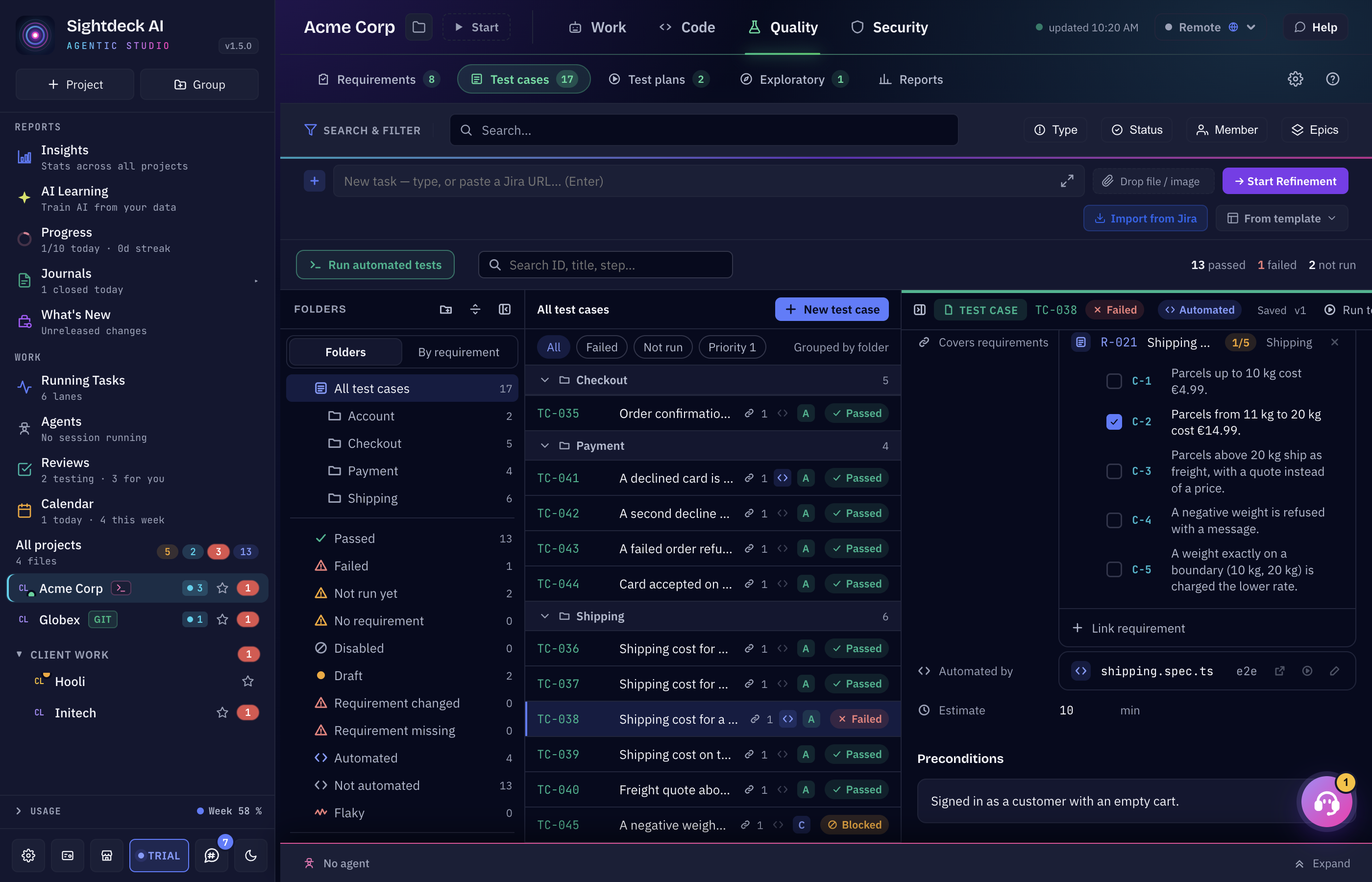
Step 4 and 5: a test case linked to its requirement and to the spec that automates it. - Link the automated script. Under Automated by, link the spec file that automates the test case, for example
e2e/shipping.spec.ts. Or right-click the file in the Code view, Quality, Link to test case…. No script yet? Draft automation lets the assistant write one in the style of your existing specs; check the selectors, then Save file and link. From then on the Code view shows a bar on that file: which kind of test it is, how many test cases it automates and its last run. Cypress and Playwright are examples; any system or end-to-end test tool that writes a JUnit XML report works.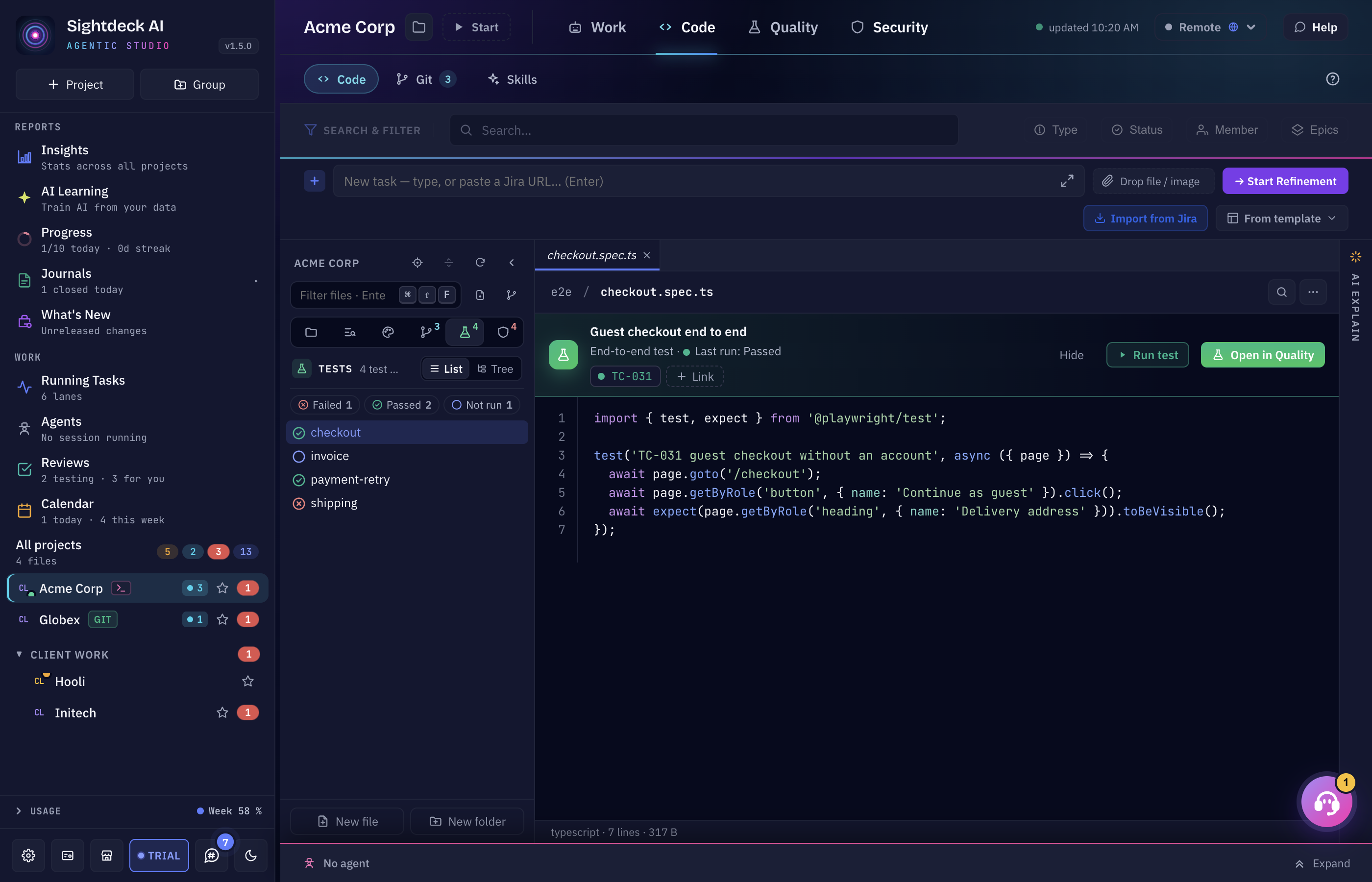
Step 5: in the Code view, the linked spec shows that it is a test and which test cases it covers. - Run and turn failures into defects. When the agent's task is done, create a test plan, for example Release 2.7 regression, and add a test run with the test cases of
R-021. Click Run automated tests in the Quality header and import the results into that run; each test case gets the result of its linked file. The test cases nobody automated, you execute in the runner, step by step. A failed test case opens Create defect, already filled in with the steps to reproduce. The defect is a task on the board, so an agent can fix it, and the test case shows Retest once its defects are done. Details: Automated test results and Test plans & runner. - Decide on Go / No-Go. The plan's exit criteria, for example pass rate at least 95 %, no open defect and all high-risk test cases passed, are checked against the latest result of every test case. The plan shows Go or No-Go and how far each criterion is from its target. The reports show coverage per requirement and how well the risky ones are tested. Details: Reports & release sign-off.
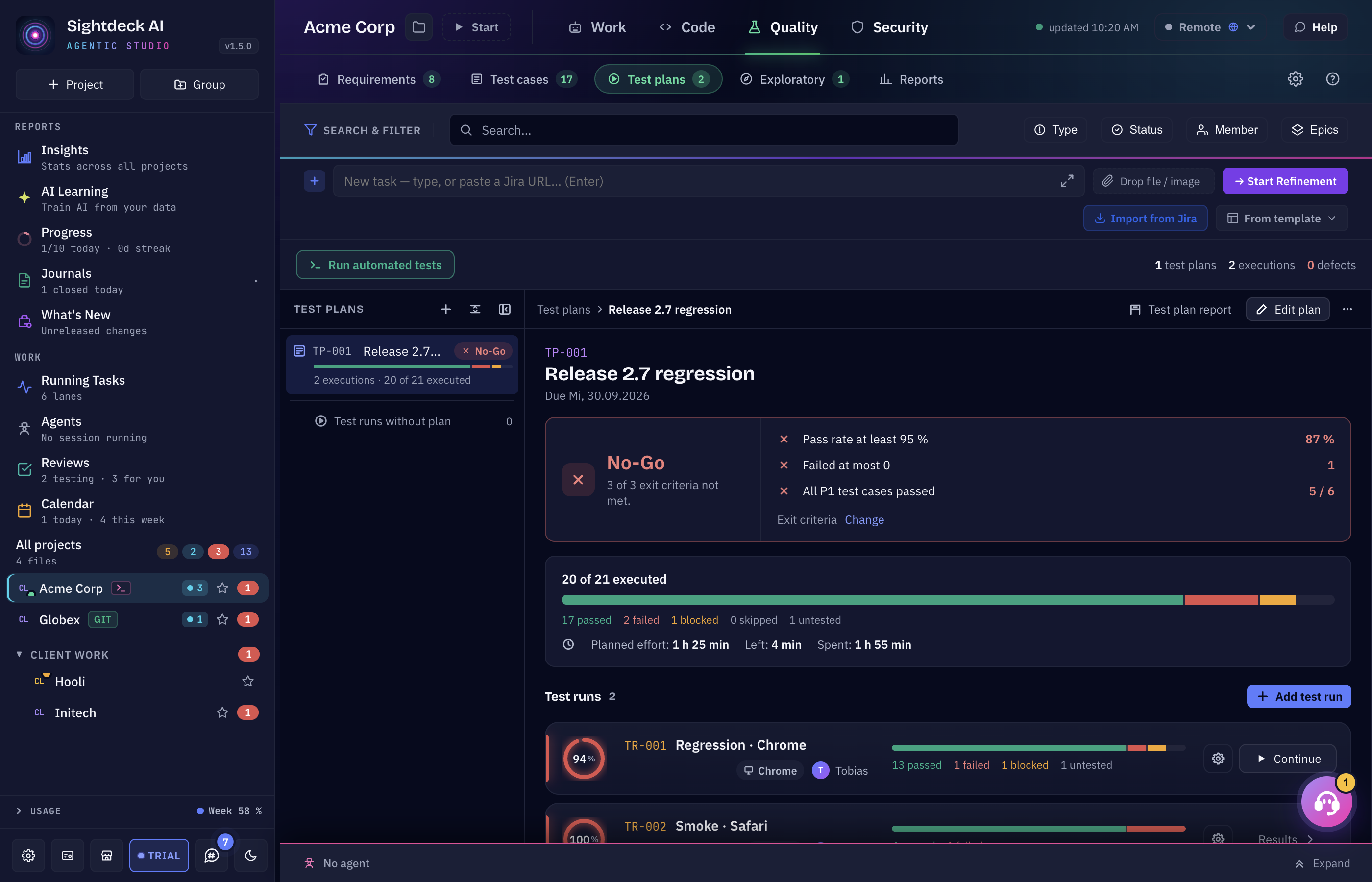
Step 7: the plan decides with its exit criteria, not with a gut feeling.
What you get
- Code that is built against a written requirement, not against a chat message.
- Test cases designed while the agent builds, so testing does not start when coding ends.
- Traceability from requirement to task to test case to result, in both directions.
- A release decision based on exit criteria and risk.
Good to know
- When a requirement changes, its test cases go back to review and show Requirement changed. Sightdeck does not rewrite them.
- Without a license, a project holds up to 5 requirements and 5 test cases.
- Requirements and test cases can be backed up as Markdown; see QA settings & Markdown backups.
Did this page help?
Thanks — noted.