
What you get
- A folder tree for your requirements, a list in the middle and the open requirement on the right.
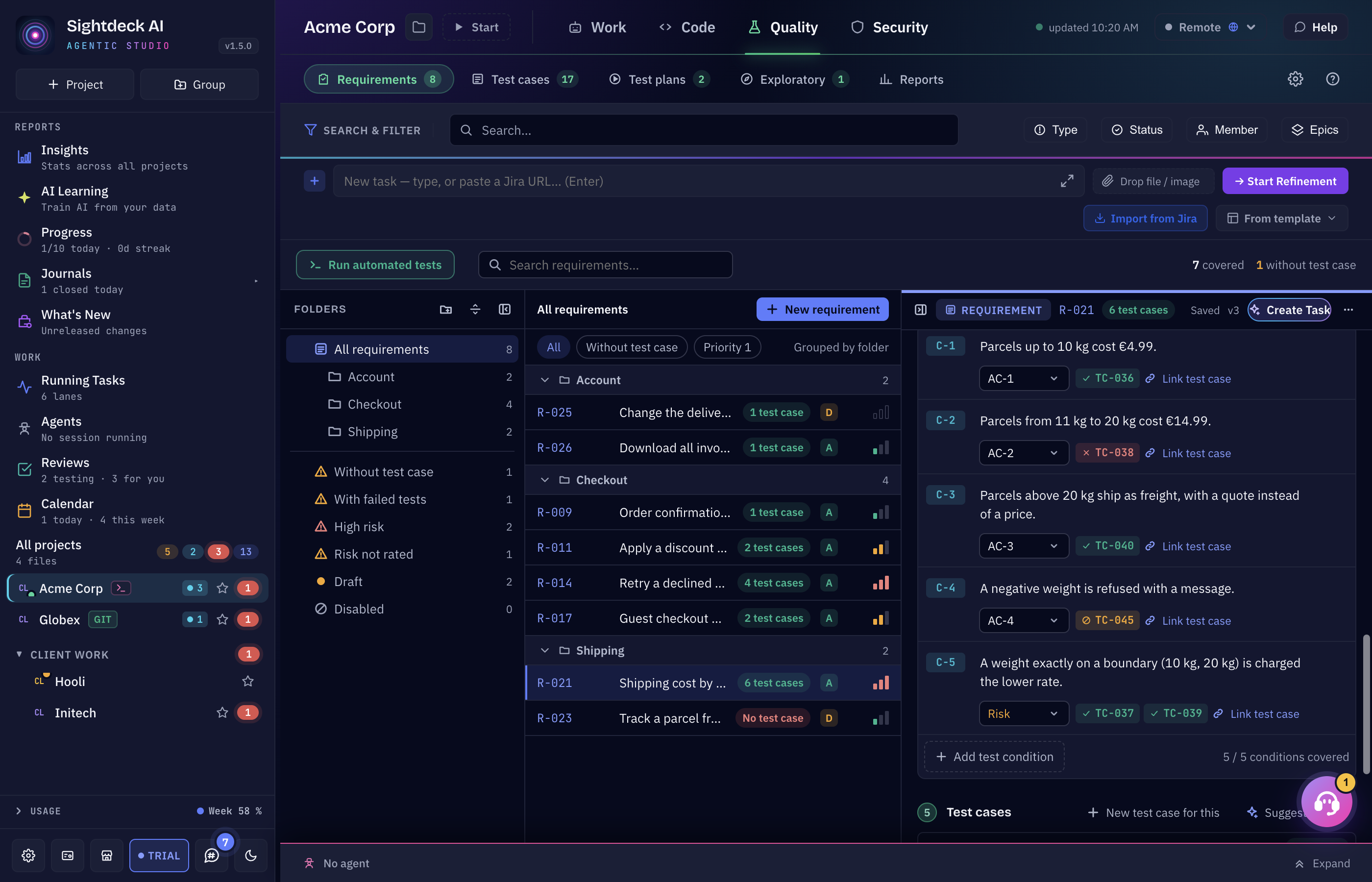
The Requirements tab with R-021 open. - Priority, review state and a risk rating (likelihood × impact) on every requirement.
- Acceptance criteria and test conditions, written by hand or drafted with AI.
- The test cases that cover the requirement, with their last result.
- Create Task: hand the requirement to an agent as a task on the board.
Write a requirement
Pick the Requirements tab and click New requirement, or right-click a folder and choose New requirement here. Each one gets an ID such as R-021 and a version that counts up when it changes.
- Title: what must the product do, in one line.
- Description: what and why. Optimize with AI rewrites it clearly and in a better structure; you see before and after and decide. Review testability reads it like a static test and points out vague words, missing limits and untestable criteria, with criteria you can add.
- Priority: P1 critical, P2 normal or P3 low.
- Review: a requirement starts as Draft and becomes Approved when someone signs it off. An approved requirement that is edited again shows Changed.
- Origin: when a requirement came from a task, it shows that task and opens it.
Rate the risk
Risk decides where testing effort goes first. Set two values under Risk:
- Likelihood: how likely is it to fail? Low, Medium or High.
- Impact: how bad is it if this fails? Low, Medium or High.
Together they give the requirement a high, medium or low risk. Smart lists such as High risk and Risk not rated find them, and the Risks report shows how well the risky ones are tested.
Acceptance criteria and test conditions
Below the description, Sightdeck walks you from requirement to test case in three steps. Criteria, conditions, test cases: what is the difference? opens a short explanation.
- Acceptance criteria answer "When does the requirement count as met?". You agree on them with the product owner or customer, written from the user's side. They are numbered AC-1, AC-2 and so on.
- Test conditions answer "What exactly do we test?". They come from the criteria and from risks nobody wrote down, such as limits, wrong input or misuse. Each one has a Source (a criterion, a risk or none) and should have at least one test case. The header counts how many are covered.
- Test cases answer "How do we check it?" with preconditions, steps and an expected result.
If both lists would be the same, Copy from criteria adds one test condition per criterion. No double list needed.
Create with AI next to each list drafts criteria from the description, or test conditions from the description and the criteria. You choose the level of detail (Short, Balanced, Detailed), the form (for example When … then … or Given / When / Then), the focus (normal flow, error cases, limits and edge cases, roles and permissions, non-functional) and how many at most. Proposals that are not in the description, or look like an existing one, are marked. Select what fits and click Take; the rest is discarded.
For inputs with ranges, combinations of conditions or states, let a model do the work instead: see Test design.
See what covers it
The Test cases section lists every test case that covers the requirement, with its folder and last result. A test condition without one shows Create test case, which creates a test case already linked to that condition, and Link test case to pick an existing one. New test case for this and Suggest with AI work for the whole requirement; see Test cases.
When you change a requirement, the test cases that cover it go back to review and show Requirement changed. Sightdeck does not rewrite them. Someone checks each one and clicks Still fits, approve, or edits it.
Create Task: from requirement to work
Create Task in the requirement's header puts a backlog task on the board for this requirement. The task is always something to do, never research: its type is feature, change or bug. Its summary names the requirement it comes from, and its concept carries:
- the requirement's ID, title, version, review state, priority, risk and origin;
- the description, acceptance criteria and test conditions;
- the tasks already created from this requirement, with their status;
- the test cases covering it, whether each one is automated, and its last result.
The refinement then decides whether the task builds the behaviour (it is missing) or verifies it (it exists and must match the requirement), and splits it into an epic when it is too big. The requirement remembers the task, so the next Create Task knows about it.
Example: R-021 "Shipping cost by parcel weight"
- Create
R-021in the folder Checkout. Description: "The shop charges shipping by the parcel's weight." - Set priority P1, likelihood Medium and impact High: a wrong price costs money on every order.
- Click Review testability. It points out that "by weight" has no limits and suggests criteria to add, such as "When the parcel weighs 0 to 10 kg, then shipping costs €4.99."
- Add the criteria for 11 to 20 kg (€14.99) and above 20 kg (freight), then open Test design to get the test conditions from a model.
- Click Create Task. Tobias, the agent, gets a task that names R-021 and its test conditions, and checks whether the shop already charges this way.
Keep the list tidy
- Folders: create, rename and nest them. Deleting a folder moves its entries one level up.
- Search requirements… filters the list.
- Disable… takes a requirement out of coverage and statistics, with a reason such as "The feature is switched off for this release". Test cases that cover only disabled requirements are disabled with it. Enable again brings it back.
- Select several entries to copy their IDs, duplicate or delete them in one go.
Without a license a project holds up to 5 requirements.
Related
- Quality overview: the whole path from requirement to release.
- Test design: models that turn into test conditions.
- QA settings: writers that set how the AI words criteria and conditions.
- Tutorial: requirements-driven coding.