
What you get
- One record per purpose, such as accounts, orders or the newsletter.
- Derive from the code: the AI writes the records for you to review.
- A status for each record: Draft, Reviewed or Changed.
- Open points per record, such as a missing legal basis or a missing processing agreement.
- Provider details, such as the processing agreement and where the data is processed, taken from the asset.
- Copy records: all records as Markdown, ready to paste.
Get your records
Click Derive from the code. The AI reads the code and writes one record per purpose, not one per asset. This takes a few minutes. What it cannot tell stays empty and shows up as an open point.
The records wait in a review box at the top of the list, each with whose data it is, how many fields and how many recipients. Accept moves a record into your list, Discard keeps it out for good. Use Accept all for all of them. You can edit a suggestion before you accept it.
To add a record by hand, click Processing activity and give it a name, a purpose and a legal basis.
The list
- Three numbers on top: how many processing activities, how many details are missing, and how many records to check for an impact assessment.
- Search by name, purpose, data, asset and more.
- Filter by Draft, Reviewed or Changed.
- Each row shows the ID, the status, the legal basis and the kinds of data, and either how many points are open or Complete.
Fill in a record
- Purpose: what the data is used for.
- Legal basis: Consent, Contract, Legal obligation, Vital interests, Public task or Legitimate interest (GDPR Art. 6). Each option says when it fits.
- Whose data, for example customers or subscribers.
- Data: Personal data, Special category, Payment card, Financial, Credentials or Session, and the Data fields that are actually stored, one per row.
- Recipients: every outside service that receives the data. Pick one from your assets (third parties and external services), or add Someone else, such as a tax advisor.
- How long it is kept, for example as long as the account exists.
- Impact assessment (DPIA): Not needed, To check or Needed.
- Stored in: the assets where the data lives, such as the database, file storage, backups and logs.
- Notes.
Open points appear on top of the record, for example No legal basis chosen or No processing agreement with a provider. When nothing is missing, it says Every required detail is there.
Provider details come from the asset
The processing agreement, where the provider processes the data, and the basis for a transfer outside the EU are set once, on the provider's asset (Properties, Data protection). A recipient picked from your assets shows these values read-only, with Set in the asset's properties and a link, Change in the asset. Change them there, and every record that sends data to that provider is up to date.
A provider outside the EU needs a basis that allows the transfer. Until one is set, the record shows it as an open point. A recipient you added as Someone else has its agreement and region right on the record.
Draft, Reviewed, Changed
- Draft: not reviewed yet. Check the data, then click Mark as reviewed.
- Reviewed: the data is right, with the date and who reviewed it. What is still open is a to-do. Back to draft undoes it.
- Changed: the master data changed after the review. The record says what changed since which date. Check it and mark it as reviewed again.
The master data is the name, purpose, legal basis, whose data, the data kinds and fields, where it is stored, the recipients, how long it is kept and the impact assessment. Notes do not count. The Overview shows how many records are reviewed, changed or still a draft, and names the changed ones.
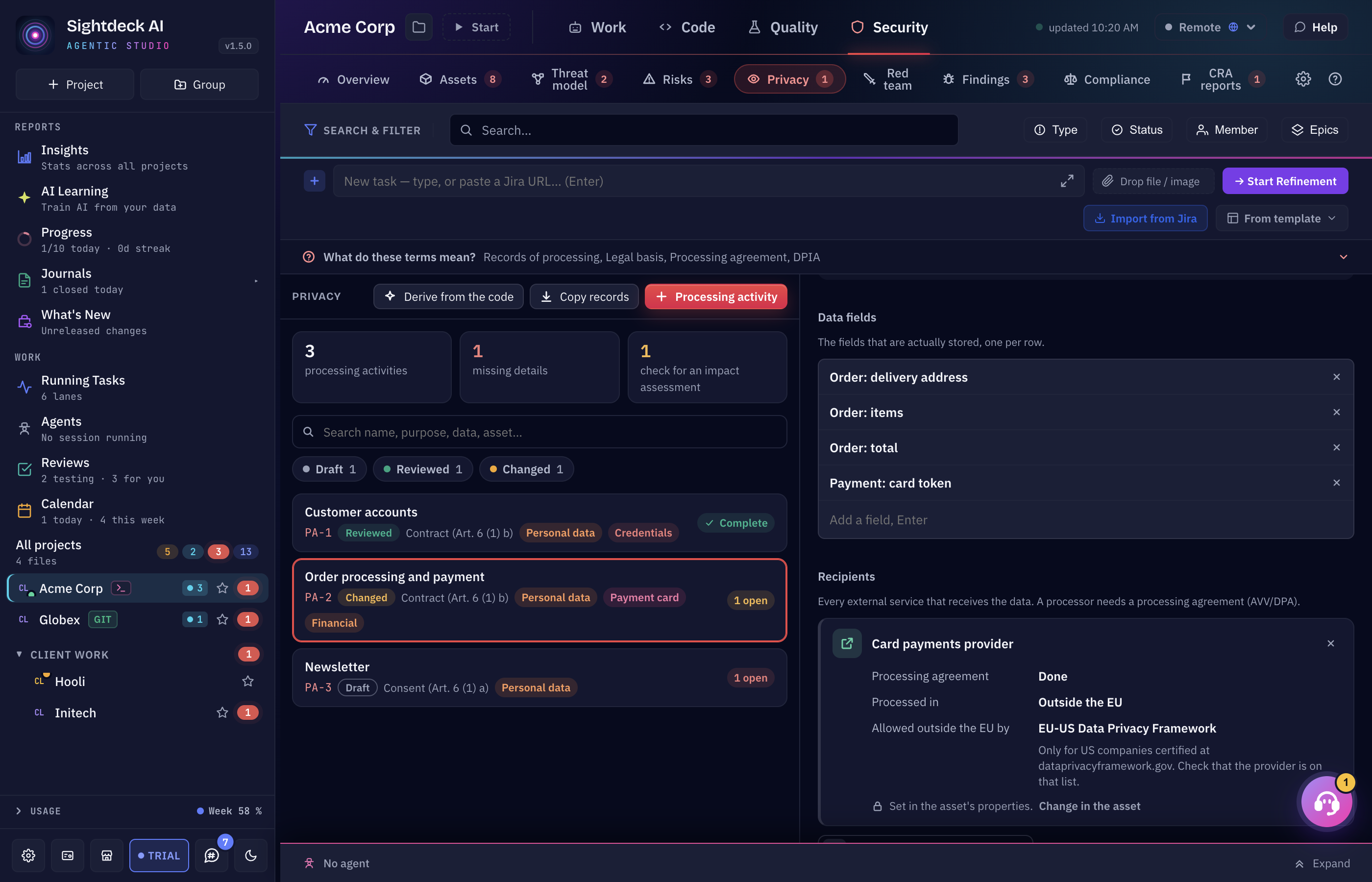
Example: checkout and payment
- Derive from the code suggests Checkout and payment with customers as data subjects, stored in
AS-7Customer database, and the payment provider as recipient. You accept it. - The record says the payment provider processes outside the EU, but nothing allows it yet. You click Change in the asset, set Standard contractual clauses on the provider's asset, and the point disappears.
- You pick Contract as the legal basis, fill in how long the data is kept, and click Mark as reviewed.
- A week later a teammate adds the field Customer: phone. The record turns to Changed and names Data fields as what changed. You check it and mark it as reviewed again.
Related
- Assets: where provider privacy data is set.
- Compliance: GDPR Art. 32 controls.
- Security overview: privacy records at a glance.