
What you get
- A work list on the left and the open risk on the right.
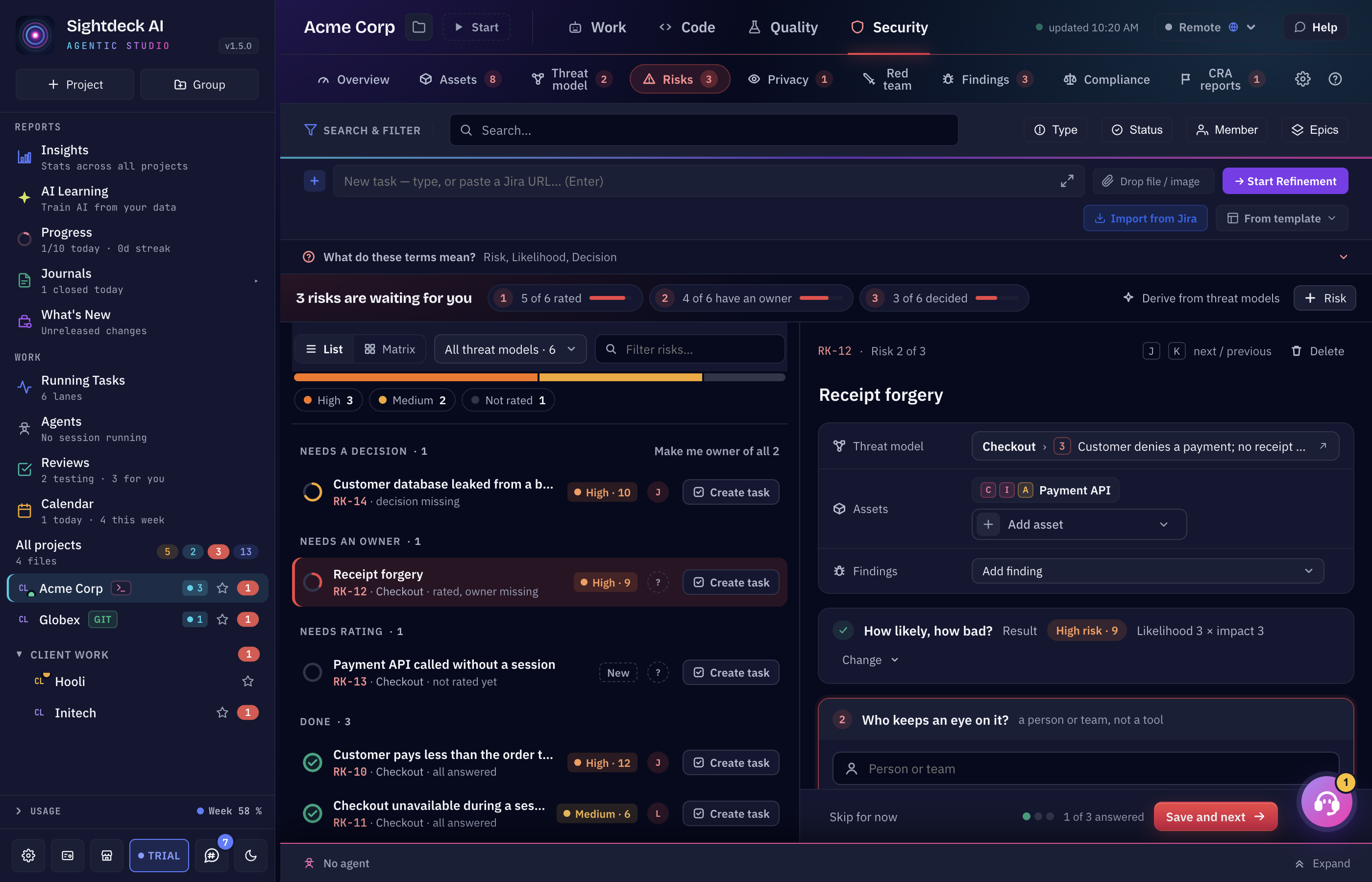
The Risks tab: the work list on the left, one risk and its three questions on the right. - Derive from threat models: one risk for every open threat that has none yet, from all threat models at once.
- Each risk shows the threat model and the threat it came from, and the assets it touches.
- Three questions per risk: how likely and how bad, who keeps an eye on it, and what you do about it.
- Create task on every risk, so an agent can work on it.
- A Matrix view that places the rated risks by likelihood and impact.
Get risks into the list
Click Derive from threat models. Sightdeck looks at every threat model at once and creates one risk for each open threat that has no risk yet. The impact is filled in from the protection needs of the assets the threat sits on; the likelihood waits for a person. A short animation shows the threats landing on the risk map. Skip ends it early.
The new risks wait in a review box at the top of the list: Found by the AI. Nothing goes into your list until you accept it. Accept or Discard each one, or use Accept all. A discarded risk is not suggested again. When every open threat already has a risk, Sightdeck tells you so.
For something no threat model covers, add a risk by hand with Risk: give it a title such as Account takeover through the admin panel and some details.
The work list
- On top, how many risks are waiting for you, and three progress bars: Rate it, Name an owner, Decide, each counting how many risks have that answer.
- The list is grouped by what is missing: Needs rating, Needs an owner, Needs a decision, then Done.
- Each row shows the ID, the threat model it came from, the level and score, and the owner's initials. Create task sits on every row; a risk that has its task opens it instead.
- Filter by threat model (or Created by hand), by text, or click a level in the bar above the list.
- Make me owner of all gives you every risk without an owner in one go.
- Switch to Matrix to see the rated risks on a 5 by 5 grid. Up is worse, right is more likely. Unrated risks stay out of the grid.
Where a risk comes from
Right under the title of a risk, Came from names its source:
- Threat model: the model and the threat, numbered like its pin in the diagram. Click it to open the threat model. A risk you added yourself says Created by hand, not from a threat model.
- Assets: the asset comes with its threat, the one the threat sits on in the threat model. It cannot be removed here. You can add more assets by hand.
- Findings: link open findings that belong to this risk.
Answer the three questions
- How likely, how bad? Pick a likelihood from 1 (Rare) to 5 (Almost certain) and an impact from 1 (Minor) to 5 (Threatens the business). Each step has a short hint, such as One bug in the code is enough. The result is likelihood times impact, from 1 to 25, shown as low, medium, high or critical. Not sure? Suggest ratings lets the AI read the code and propose a rating for every risk not rated yet. Use it takes a suggestion.
- Who keeps an eye on it? A person or a team, not a tool. Quick picks offer Me, the owner of the asset, and the owner you used last. The field also suggests people from your team and from Responsibilities. A new name you type is added to Responsibilities.
- What do we do about it?
- Reduce: change something so it gets less likely or less bad. Write the measure and a date, and Create task.
- Accept: live with it for now, with a reason and an end date. After that date the risk counts as open again. Extend by 6 months or Reduce it instead.
- Transfer: someone else carries it, such as a provider, a contract or an insurance. Name who.
- Avoid: stop doing the thing that causes it. Describe what is removed.
Save and next moves on to the next risk, Skip for now leaves this one for later. J and K step through the list. An answered question folds away; Change opens it again.
Example: RK-12 Receipt forgery
- In
TM-2Checkout the threat Receipt can be forged is still open. On the Risks tab you click Derive from threat models and accept the suggestion. It becomesRK-12Receipt forgery. - Came from shows Checkout › 3 Receipt can be forged, and
AS-4Payment API as its asset. Because the Payment API is rated Very high, the impact is already 5, marked from the asset. - You pick likelihood 3, A skilled attacker could do it. The result is 15, a high risk.
- You pick the team that owns the Payment API from the quick picks.
- You decide Reduce, write Sign receipts on the server as the measure, and click Create task. Mint, an agent, picks the task up.
Related
- Threat models: where the risks come from.
- Assets: protection needs set the impact.
- Red team and findings: test whether a measure holds.
- Security overview: the biggest rated risks at a glance.