
What you get
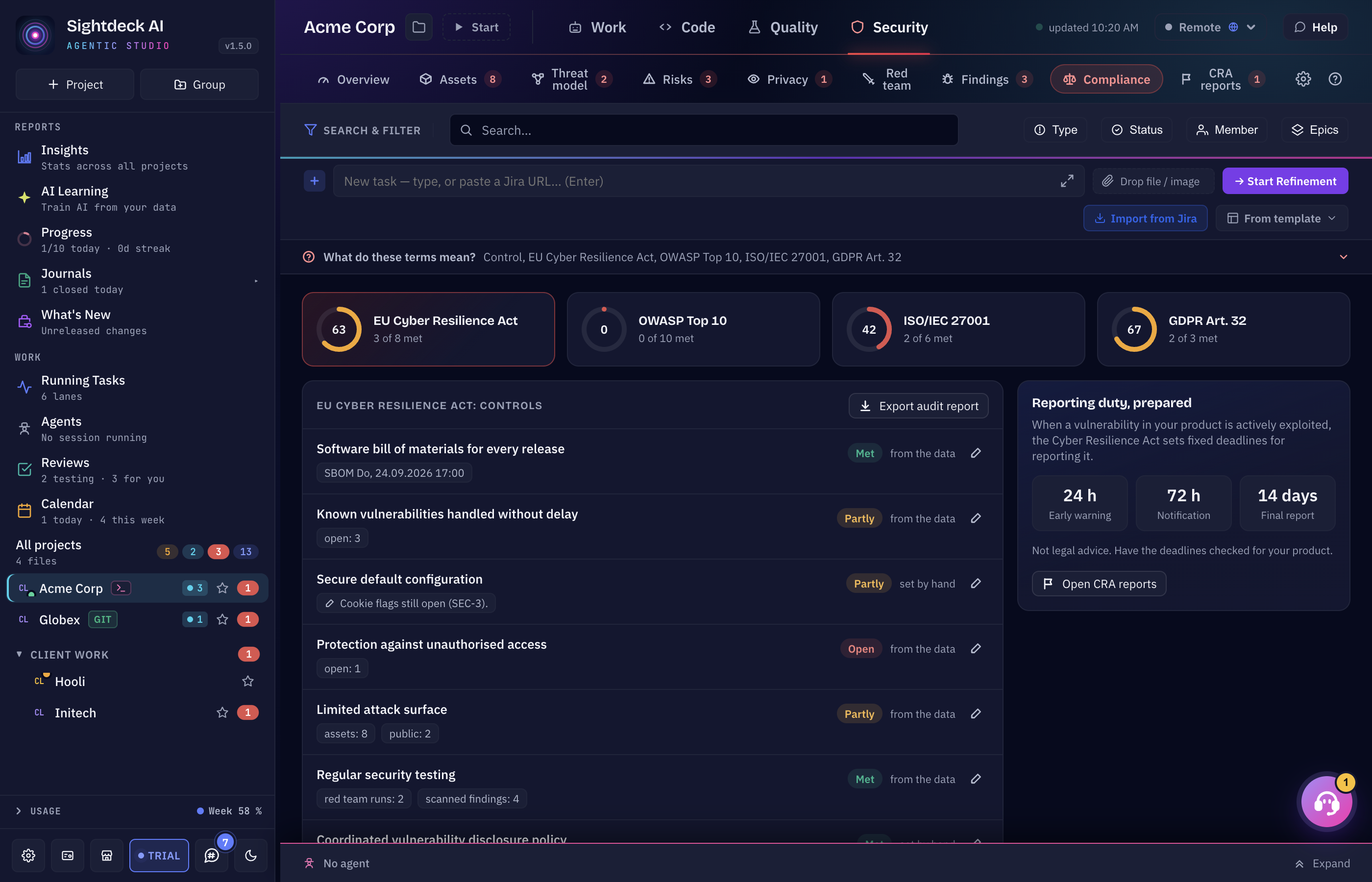
- Four frameworks: EU Cyber Resilience Act, OWASP Top 10, ISO/IEC 27001 and GDPR Art. 32, each with a score.
- A state for every control, judged from your data or set by hand, with a note.
- Export audit report for the framework you have open.
- A CRA reports tab with the reporting deadlines, a countdown and a draft of each message.
Frameworks and controls
The cards on top show each framework with a score and how many of its controls are met. Click a card to see its controls. A control is one requirement, for example Known vulnerabilities handled without delay.
- Each control has a state: Met, Partly, Open, Not applicable or To review.
- Sightdeck judges the state from the data: your findings, threat models, red team runs, assets and SBOM exports are matched to the controls. The evidence shows under each control, for example the date of the last SBOM, open and fixed findings, or the number of threat models and red team runs.
- Click the pencil to set a state by hand and add a note for the auditor. The control then says set by hand. Pick From the data to go back.
The OWASP Top 10 uses the 2021 edition. Findings are sorted into its categories by their CWE.
Export an audit report
Export audit report saves the controls of the framework you have open as a Markdown file: how many controls are met, a table with each control's state, evidence and note, then the open findings and the threat models with how much of each is mitigated. Pick where to save it.
The CRA reporting duty
When the EU Cyber Resilience Act is open, a card shows the reporting duty: when a vulnerability in your product is actively exploited, the act sets fixed deadlines. 24 h for the early warning, 72 h for the notification, 14 days for the final report. Open CRA reports takes you to the reports.
This is not legal advice. Have the deadlines checked for your product.
CRA reports
Sightdeck keeps the time and drafts the messages. You send them.
- To check lists open findings with a proven exploit that have no report yet. A finding like that also shows This vulnerability is actively exploited in its details.
- Check the duty to report asks three questions: is it actively exploited, is it in a product made available on the EU market, and are you the manufacturer of that product? Only when all three are yes does it open a new report, filled in from the finding. Otherwise it says there is no duty to report.
- Report starts one by hand: a Vulnerability or an Incident, what happened, the product and version, and Known since. The clocks start at Known since, not when you create the report.
Deadlines and drafts
- Early warning within 24 hours, to the coordinating CSIRT via the ENISA single reporting platform.
- Notification within 72 hours: details, how it is exploited or what kind of incident it is, and the measures taken.
- Final report: for a vulnerability at the latest 14 days after a fix is available, for an incident at the latest one month after the notification. Until a fix date is set, a vulnerability's final report waits for a fix.
Each step shows its due date and a countdown, and turns urgent as the time runs out. Mark as sent records when a step went out. For the next step, a draft is ready in English, as the reporting platform expects. Copy puts it on the clipboard. Fill in the brackets before you send it.
A report also records Fix available since and whether Users informed: users also have to learn about the vulnerability and what they can do about it. Add Notes on what happened, what was done and who was told.
Example: the Acme shop under the CRA
- The EU Cyber Resilience Act card shows a score below 100. Software bill of materials for every release is open. You export an SBOM on the Assets tab, and the control picks up the date as evidence.
- Coordinated vulnerability disclosure policy is handled outside Sightdeck. You set it by hand to Met and write where the policy lives.
- A finding on
AS-4Payment API turns out to be exploited in the wild. It appears under To check. Check the duty to report gets three yes answers and opens a report, with Known since set to when the finding was created. - You copy the early warning draft, fill in the brackets, send it, and click Mark as sent. The countdown moves on to the notification.
- Before the audit, Export audit report saves the controls as Markdown.
Related
- Red team and findings: where exploited vulnerabilities show up.
- Assets: SBOM export and the inventory.
- Privacy: the records of processing activities.
- Security overview: the release gate.