
What Sightdeck AI is
Sightdeck AI is a desktop app that organises work for coding agents. You describe what you want, Sightdeck turns it into tasks, starts each one on an agent in your project folder and keeps the board in sync with what that agent is really doing. The agent itself is not part of Sightdeck — you bring your own:
- Providers. A provider is one agent setup: Claude (Claude Code), Codex or any OpenAI-compatible endpoint such as OpenRouter or Ollama, with its command, its configuration folder, its models and its colour. Add as many profiles as you need — a second Claude account, Codex next to Claude — and let every project pick its own default. See Providers.
- Board. Backlog, Up Next, In Progress, Needs You, In Testing and Done — every task of every project in one lifecycle. See Status lifecycle.
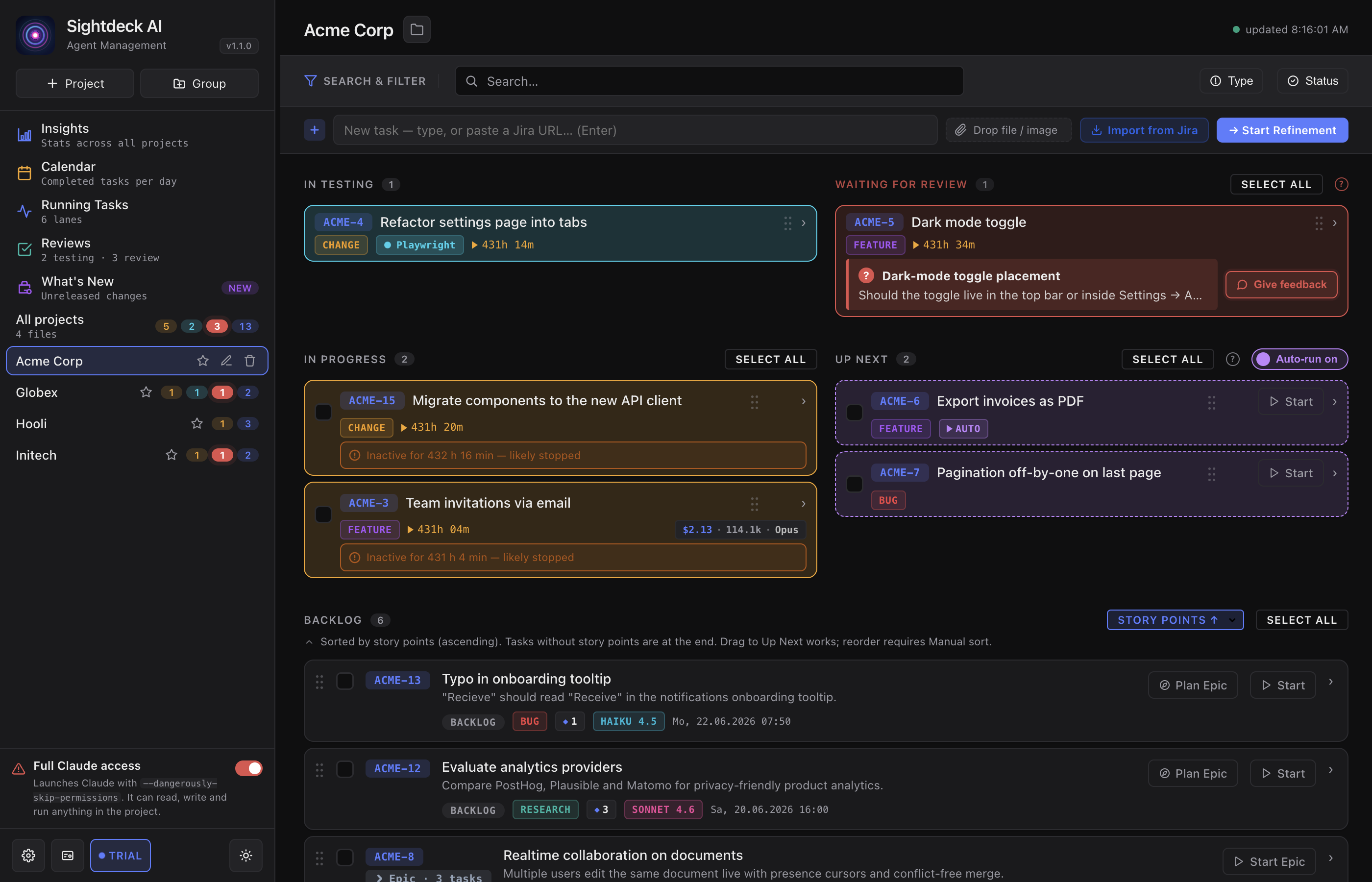
The Sightdeck AI board — every task in one lifecycle view. - Agents. Every running session inside the Sightdeck window, with its task, status, branch and changes; answer, stop or open one full size. A terminal dock under each project keeps sessions at hand. See Agents view.
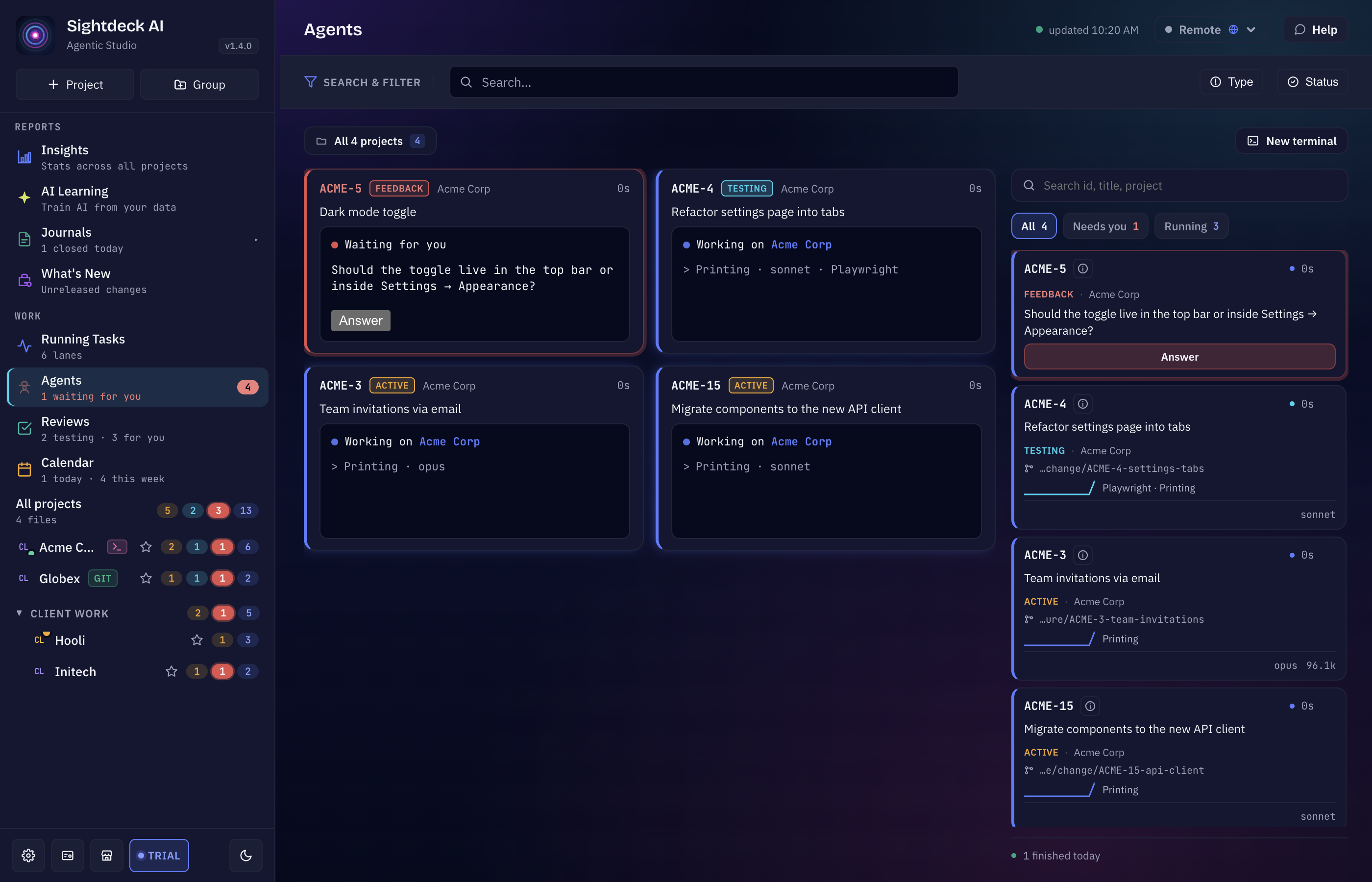
The Agents view — every running session inside the Sightdeck window. - Stages and Workflows. Run a task through several stages — for example build on one provider, review on another — each following a workflow you draw. See Stages & Workflows.
- Coding. Browse and edit your project's files, review every change an agent made, work with Git in a full client, and manage the skills your agents use. See Code view, Git client and Skills.
- Quality. Requirements with risk, test design, test cases, test plans, exploratory testing and reports, with traceability from requirement to result. The AI suggests, a person decides. See Quality overview.
- Security. Assets, threat models, risks, privacy records, red team runs, compliance and CRA reports. See Security overview.
- Team. Team Chat with your agents and colleagues, and the AI Buddy with its jobs. See Team Chat and AI Buddy.
- Store. Ready-made workflows, agents, Definition of Done checklists, instruction templates, skills and more — install them into your projects. See Store.
- Insights and AI Learning. What your runs cost and how long tickets really take — and estimates that learn from your own finished tasks. See Insights and AI Learning.
Everything else builds on these: task dependencies, the Profiler for every run, Definition of Done checklists, the Approval Gate, usage limits, and the Help and Ask the project chats.
Start here
If this is your first time with Sightdeck AI, follow Getting Started top to bottom. If you already run it and need a refresher on one feature, use the sidebar.
Prefer one guided walkthrough? From scratch: your first project covers the provider, the project and the first task, and the choice between a shared board in git and keeping Sightdeck on your computer only.
Pick a topic
The guide is split into nine areas. Each tile lands you on the first page of that area — the sidebar then carries you through the rest.
Install and get going
Install the app and your agent, add a provider, install the skill, activate your license, run your first task — the five-minute path from zero to a green tile.
7 pages ConfigurazioneConfigure providers and projects
Providers, the Store, AI Learning, Definition of Done, Instructions, the Approval Gate, Follow-up Tasks, ticket types, Startup Commands, usage limits, schedules, the archive, Sightdeck Remote — everything Sightdeck AI reads from a project and how to configure it.
33 pages WorkflowRun a day's worth of work
Refinement, the status lifecycle, the Agents view, Stages & Workflows, task dependencies, the Profiler, Up Next, Epics & subtasks, reviews, token costs — the day-to-day moves.
28 pages CodingCode, Git and skills
The Code view with Code Review, the Git client with its merge editor, and the skills your agents use.
3 pages QualityRequirements to release sign-off
Requirements and risk, test design, test cases, test plans and the runner, exploratory testing, automated results, reports and Go / No-Go.
9 pages SecurityAssets, threats, risks, red team
Assets and crown jewels, threat models, risks, privacy records, red team runs, compliance and CRA reports.
7 pages TeamWork together with agents and people
Team Chat, the AI Buddy, Buddy Jobs and the agent setup check.
4 pages IntegrazioniConnect Git, Jira, GitHub, webhooks
Git branches and worktrees per task, Jira tickets, GitHub issue import, webhooks, import & export, Launch Actions.
9 pagesHow the guide is organised
- Every page follows the same shape: What it is, What you get, How you use it. Short, no padding.
- Where the providers behave differently, the page says so. Everywhere else, "the agent" means whichever provider runs the task.
- The sidebar on the left lists every page in stable order. The same order drives the prev / next buttons at the bottom of each page.
- Code, file paths and configuration values appear in
monospaceso they're copy-pasteable.
Found a stale page or a broken link? Tell us via the contact page with the URL — guide pages move as features evolve, and we want them flagged early.