
Three kinds of link
- Blocked by — this task waits for the one you pick.
- Blocks — the task you pick waits for this one. It is the same link seen from the other side.
- Relates To — just a link, no waiting either way. Use it for tasks that belong together without an order.
The task that has to be done first is the predecessor. A predecessor counts as open until it is done.
Steps
- Break the feature into tasks. Add one task per piece of work with the Quick-Add field — see Backlog refinement. If you'd rather start from one big description, add it as a single task and use Plan Epic, which splits it into subtasks — see Break a big task into an Epic. Already have loose tasks? Select them and click Merge into Epic, then Create Epic; the new Epic names itself.
- Mark what is blocked by what. Open the task that has to wait. On its Overview tab, find Dependencies, pick Blocked by, and type into Search tasks by id or title…. Click the task it waits for. Repeat for every link you know about. Sightdeck AI refuses a link that would close a loop, and marks it as cycle in the search.
- Let the AI suggest missing links. You rarely think of every link yourself. Two ways to ask:
- In one task's Dependencies, click Suggest to look for links this task is missing.
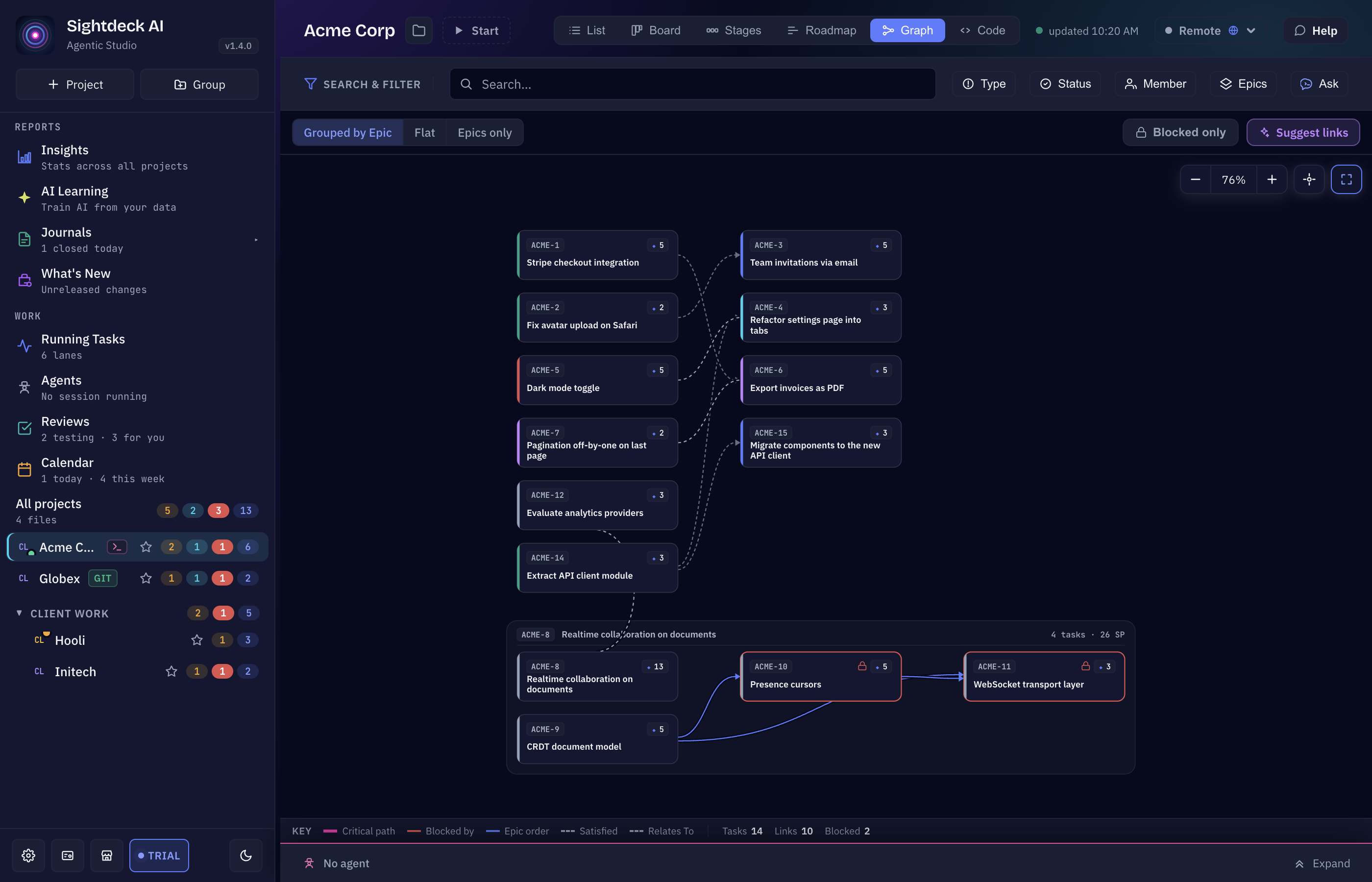
- In the Graph view, click Suggest links to scan the whole project.
- Check the Dependency Graph. Switch the project's view to Graph. Every task with at least one link is drawn, with arrows from predecessor to the task that waits. To read it:
- Blocked only shows just the tasks waiting on an open predecessor, plus what they wait on.
- Critical path highlights the chain with the most Story Points — the sequence that decides how long the whole feature takes.
- The grouping switch shows the tasks Grouped by Epic, Epics only or Flat.
- Choose Block or Warn. Open Project Settings → Dependencies and set Starting a task with an open predecessor:
- Block — Start stays disabled until the predecessors are done. The Up Next scheduler also skips such a task until then.
- Warn (the default) — Start works, and a strip names what is still open.
- Off — no strip, nothing is prevented.
- Let Up Next order the queue. Move the tasks to Up Next. If one of them comes up before its predecessor, a strip above the queue says so, e.g. 1 ticket comes up before its predecessor. Click Fix the order: the queue is sorted so every predecessor runs before the task waiting on it, and tasks without a link keep their position.
- Run it. Let the scheduler work through the queue — see Up Next auto-scheduler. For an Epic, Start Epic runs its subtasks one after another; when they are linked, they run in dependency order rather than list order. A queued task that is held back says why in the Agents view, e.g. Waiting for ….
What you get
- The order of the work is written down once, in the tasks, instead of living in your head.
- A graph that shows what is blocked and which chain decides the finish date.
- A queue that runs in the right order, so no agent builds a screen for an API that isn't there yet.
这个页面对你有帮助吗?
谢谢,已记录。