
What you get
- Findings that do not get lost: anything the agent does not fix in the same run can become a backlog task of its own.
- Control over the noise: you pick which kinds of findings count, and how many tasks one run may create.
- Follow-ups you can find again, with a tag on every one and an extra tag per kind if you want.
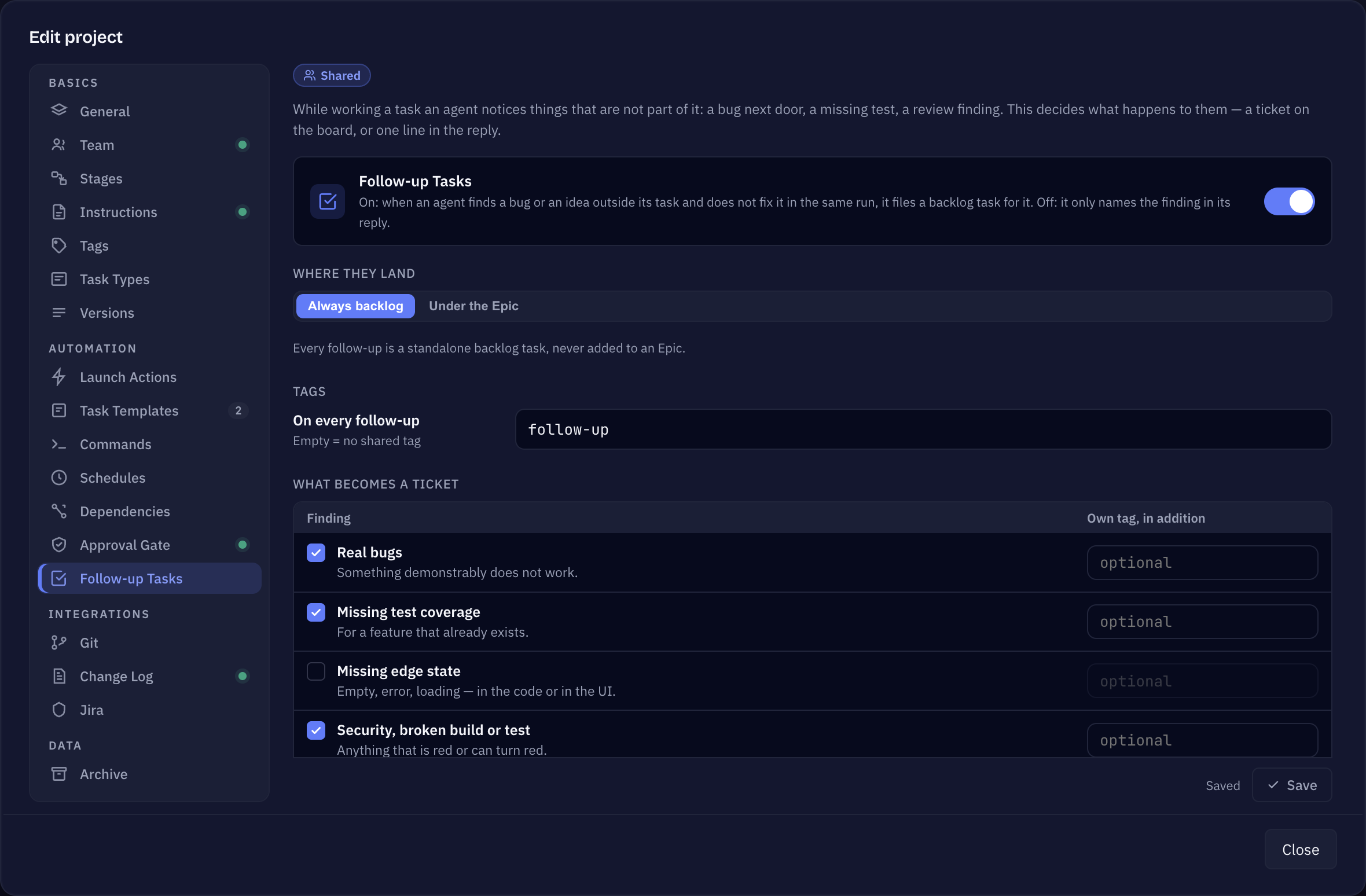
How you set it up
Open Edit project → Follow-up Tasks. Every setting starts on the behaviour Sightdeck had before this tab existed, so you only change what you want different.
- Follow-up Tasks (switch, on by default) — on: when an agent finds a bug or an idea outside its task and does not fix it in the same run, it files a backlog task for it. Off: it only names the finding in its reply.
- Where they land
- Always backlog (default) — every follow-up is a standalone backlog task, never added to an Epic.
- Under the Epic — when the task is a subtask and the finding belongs to its Epic, the follow-up joins that Epic. Anything else still goes to the backlog.
- Tags — On every follow-up sets one tag that every follow-up gets, for example
follow-up. Leave it empty for no shared tag. Next to each kind you can add an Own tag, in addition. A tag can be up to 40 characters and must not contain a comma. What a follow-up gets shows the result. - What becomes a ticket — tick the kinds of findings that may become a task (all are ticked by default):
- Real bugs — something demonstrably does not work.
- Missing test coverage — for a feature that already exists.
- Missing edge state — empty, error, loading, in the code or in the UI.
- Security, broken build or test — anything that is red or can turn red.
- Inconsistent tokens or styles — a colour, a spacing or a component out of line.
- Ideas and improvements — no defect, a suggestion. Unticked, ideas only appear in the reply.
- How many — the most follow-ups one run may create (
0= no limit), and a separate limit for a review run (0= the limit above applies). Both go up to 20. Anything above the limit is only named in the reply; in a review the most important blocker comes first, then the most important warning. - Save.
What never becomes a ticket
Whatever you tick, some findings are always left in the reply: process, skill and meta remarks, taste without consensus, duplicates, and NITs — tiny remarks not worth a task of their own.
What the agent is told
At the bottom of the tab, What the bootstrap prints of this shows the exact lines the agent receives at the start of a session. Only settings that differ from the default are listed — with everything on its default it reads Nothing — everything is on its default. A change applies from the next session.
Follow-ups are ordinary tasks: they wait in the backlog (or in their Epic) until you start them. To find them quickly, give them a tag and filter the board by it — see Project tags.