
What you get
- Runtime estimates such as “1h” that match how long that kind of work really runs in this project.
- Remaining time on running tasks and lanes (“~25 min left”) built from the learned times instead of a fixed scale.
- Refinement that knows which Story Points you usually correct, and in which direction.
- An early warning for the kind of task that tends to come back to you instead of finishing in one go.
- For every module, a line that says whether applying it actually made things better.
Where you find it
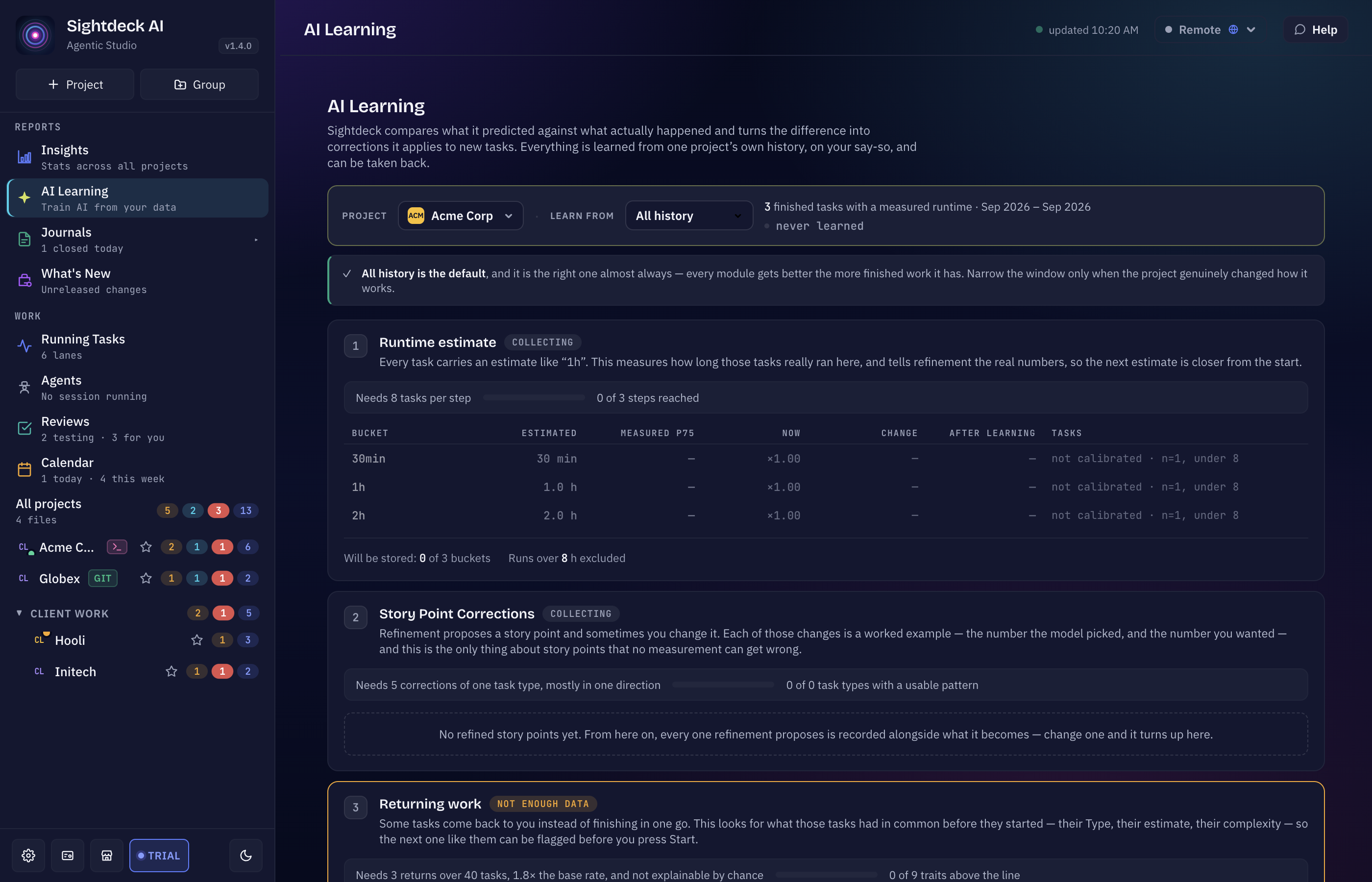
In the sidebar, under Reports, right below Insights: AI Learning (“Train AI from your data”).
At the top, pick a Project. Everything on this page is measured from one project’s own finished work, so without a project there is nothing to show. Next to it, Learn from sets the time window: All history (the default), Last 12 months, Last 6 months or Last 90 days. Only narrow it when the project really changed how it works — the page tells you how many finished tasks remain in the window and whether a module drops below what it needs.
The three modules
Every module card has the same shape: what it learns, what it needs against what the project has, a preview of what would change, and the Apply button.
- Runtime estimate — measures how long tasks with an estimate like “1h” really ran here, per estimate bucket, and tells refinement the real numbers. A bucket needs at least 8 finished tasks. The preview shows, per bucket, the estimate, the measured value, the factor in use now, the change and the value after learning.
- Story Point Corrections — refinement proposes Story Points and sometimes you change them. Each change is recorded next to the proposal. Once a Type has at least 5 corrections that mostly go the same way (for example “one step lower”), applying it tells refinement about that pattern. Refinement still decides for itself; it is a record of what happened, not a rule.
- Returning work — looks for what tasks that came back to you had in common before they started: their Type, estimate, Story Points, design or planning marks. A trait only counts when it came back at least 3 times over at least 40 tasks, clearly more often than the project’s average, and not by chance.
States on a module
- collecting — not enough finished work yet. Every task you close counts toward it.
- not enough data — there is data, but nothing clears the bar yet (for example corrections that pull in both directions).
- ready — there is something usable to apply.
- applied to new tasks — values are stored and used by refinement; the card also shows when the project last learned.
How you use it
- Open AI Learning and pick the project.
- Read a module’s preview: what is stored now and what would be stored after learning.
- Press Apply. The values are stored for the project and used for the next refinement and the remaining-time display. Press Apply again later to learn from the tasks that finished since.
Applying never changes an existing task. It changes what refinement and the time estimates do from now on.
Did it help?
Once a module has been applied, its card measures the effect on what that module is meant to improve — the estimate error, the share of corrected proposals, or the work that came back — before and after, for example “estimate error: 42% before, 31% after, 11 points better”. The comparison appears after 5 tasks have finished since you applied it; until then the card says how many are still missing.
Where the learned numbers show up
Running tasks and lanes show their remaining time from the learned factors, and the tooltip names the factor, the number of finished tasks and the date it was learned. A task whose estimate bucket has not been learned yet says no learned time. See Live Progress & ETA and Backlog refinement.