
Which chat for which question
- Help — "How do I license a second machine?", "How do Epics work?", "How do I connect Remote?". The answer comes from the Sightdeck documentation and user guide.
- Ask the project — "Where does the app start?", "How do I run the tests?", "Who uses this file?". The answer comes from the files of the open project.
Help: questions about Sightdeck AI
Click Help in the header. A panel opens on the right, titled Help — Answers from the docs and user guide.
- Type your question into Ask a question… and press Enter (Shift+Enter starts a new line). On a fresh start the panel also offers a short Frequently asked list — click one to send it.
- The answer arrives in the panel. Below it, Sources links up to three pages of the documentation the answer was taken from, so you can read the full text.
- Close the panel with the button again or with Esc. Drag its edge to make it wider or narrower.
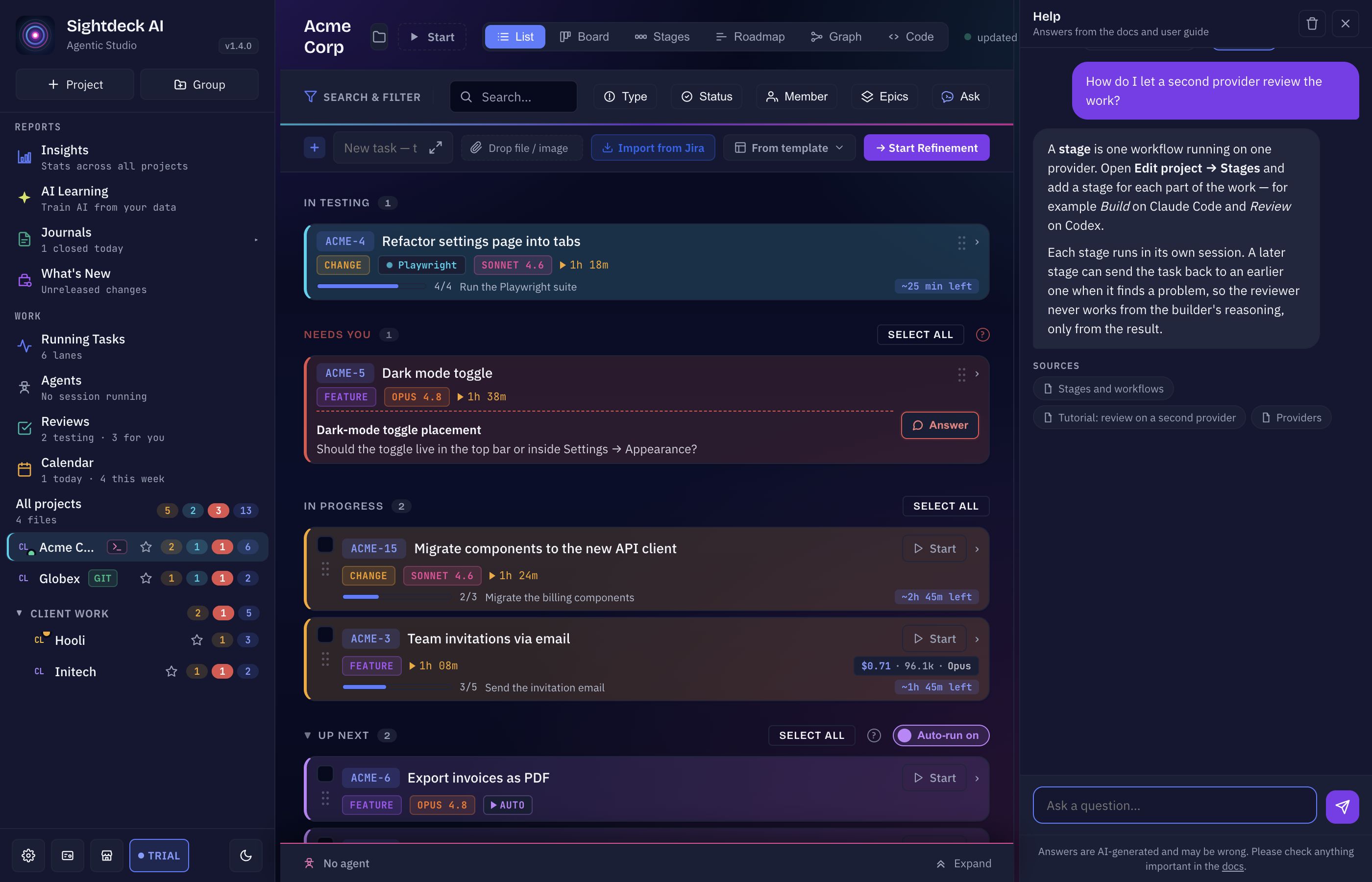
Answers are written by an AI and can be wrong. The panel says so under the input field and links the documentation — check anything important there.
What Help sends and what it keeps
- Sent: your question goes to sightdeck.app, together with your Sightdeck version, your operating system and — if a task is selected — that task's number and title, so the answer can fit your situation. Nothing else from your projects is sent.
- Follow-ups continue the conversation: a question you ask after an answer is sent as part of the same conversation. After a restart of the app, or once you delete the history, the next question starts a new one. If an answer seems to have lost the thread, repeat the important detail.
- Length: a question can be up to 2,000 characters. A longer one is refused with That message is too long — please shorten it.
- Kept on your computer: the conversation is stored in a small file on your computer, so it is still there after a restart. It keeps the newest 200 messages; older ones drop off.
- Delete it: Delete history in the panel's header removes the stored conversation from your computer after you confirm.
Help needs a connection to sightdeck.app. When the service cannot be reached at startup, the Help button is not shown at all; a failed answer later says No connection to sightdeck.app. or asks you to try again in a moment.
Ask the project: questions about your code
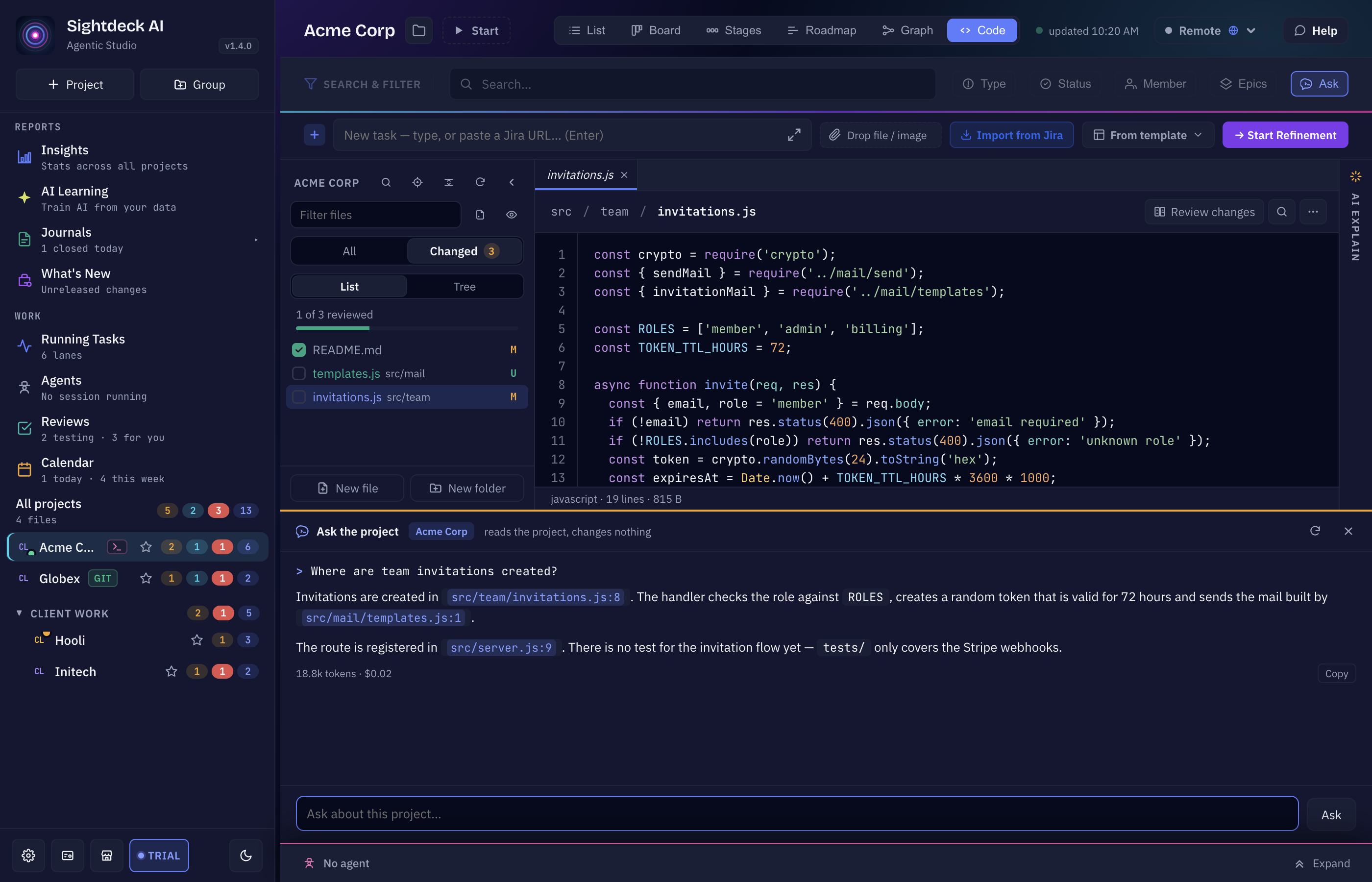
Open a project and click Ask at the right end of the search row. A pane titled Ask the project opens under the main view, with the project's name and the note reads the project, changes nothing.
- Type into Ask about this project… and press Enter, or click one of the suggested questions: What does this project do?, Where does it start, and what runs first?, How do I run the tests?, How is the code laid out? When a file is open in the Code view, two more appear: What does <file> do? and Who uses <file>?
- While it works the pane shows reading the project…. Stop cancels the question.
- File names in the answer, such as
src/app/main.js:12, are clickable — they open the file in the Code view at that line. - Under each answer you see the tokens and the cost of that question, and Copy puts the answer on your clipboard.
- Start over clears the conversation; the close button or Esc hides the pane. Drag its top edge to change its height.
How Ask the project answers
- Your project's provider. The question runs on the default provider of the project, started in the project folder. With Claude Code it uses the project's Refinement model.
- Read-only. With Claude Code the agent may only read and search files — editing, writing and running commands are switched off. Codex runs in a read-only sandbox. A custom provider is told to change nothing, but Sightdeck cannot enforce that for it.
- Follow-ups work. The last few questions and answers ride along, so "and where is that called?" means something.
- What you are looking at counts. If a file is open in the Code view, the agent is told which one.
- One conversation per project, kept while Sightdeck runs — switch views or projects and come back to it. It is not stored after you quit.
- Limits: a question can be up to 2,000 characters, and an answer that takes longer than three minutes is stopped.
Ask is only there when a single project is open — not in All projects and not on pages such as Insights. In the Code view it is the one button in the search row that stays active.