
What you get
- Sessions with a charter, areas, a tester and setup, and a time-box.
- Tours and heuristics as lenses, with a suggested route through them.
- Fast notes while you test: bugs, changes, ideas, questions and notes, with screenshots.
- A debrief that turns findings into tasks, requirements, test cases or criteria.
How a session works
- Charter: the goal and area of the session, maybe first test ideas.
- Time-box: one uninterrupted session, typically 60 to 90 minutes.
- Test and take notes: learn, design and run tests at the same time. Notes, bugs, questions, ideas.
- Debrief: go through the results, turn findings into work, plan the next session.
Plan a session
Open the Exploratory tab and click New session.
- Title: what this session is about.
- Charter: the mission in one sentence: explore an area, with resources, data or a tour, to discover what you want to learn.
- Areas: the folders from Requirements. A folder covers everything below it. Every finding remembers where it was made.
- Tester & setup: who tests on which build, environment and device. It goes into every task made from a finding, so a bug can be reproduced.
- Time-box: how long you test. When the time is up Sightdeck reminds you of the debrief; the session keeps running until you end it.
- Test ideas (optional): edge cases, data, interruptions you want to try.
- Tours & heuristics: lenses such as the Money tour, Bad data, Interruptions or Persona: first-time user. Sightdeck suggests tours for the chosen areas; click one to see what to do and what to look for.
A small check shows whether the charter is ready (areas, goal, tester, time-box). Save as draft keeps it for later, Start session begins.
Test and take notes
- Pick a type with ⌥1 to ⌥5 (Bug, Change, Idea, Question, Note) and type. Enter saves, Shift+Enter starts a new line.
- Paste a screenshot with ⌘V to attach it to the finding.
- Click an area to set where you are. You can also point the next findings at a specific requirement.
- With several tours, Sightdeck splits the time across them and nudges you when it is time to switch. Every finding remembers the active tour.
- Pause and Resume when you are interrupted.
End & debrief finishes the session. If a planned tour was never visited, Sightdeck asks first.
Debrief: turn findings into work
Every finding waits for a decision. Give it a priority (High, Medium, Low) and pick what it becomes:
- Create bug task or Create task: a task on the board with the finding, its area and requirement.
- Create test case: a test case that covers the requirement.
- Create requirement in the finding's area, or Update an existing one.
- Add as criterion to the requirement.
- Ask in Team Chat with the finding as context; it stays open.
- Discard what is not worth keeping.
Converted findings move to Converted, so you always see what is still open. The debrief also asks short questions for the talk afterwards (past, results, obstacles, outlook, and how good the area feels: Solid, Shaky or Poor), shows where the time went (testing, bug investigation, setup) and which tour found what. Follow-up session starts the next round with the outlook as its test ideas. Copy the session as Markdown or save it as PDF.
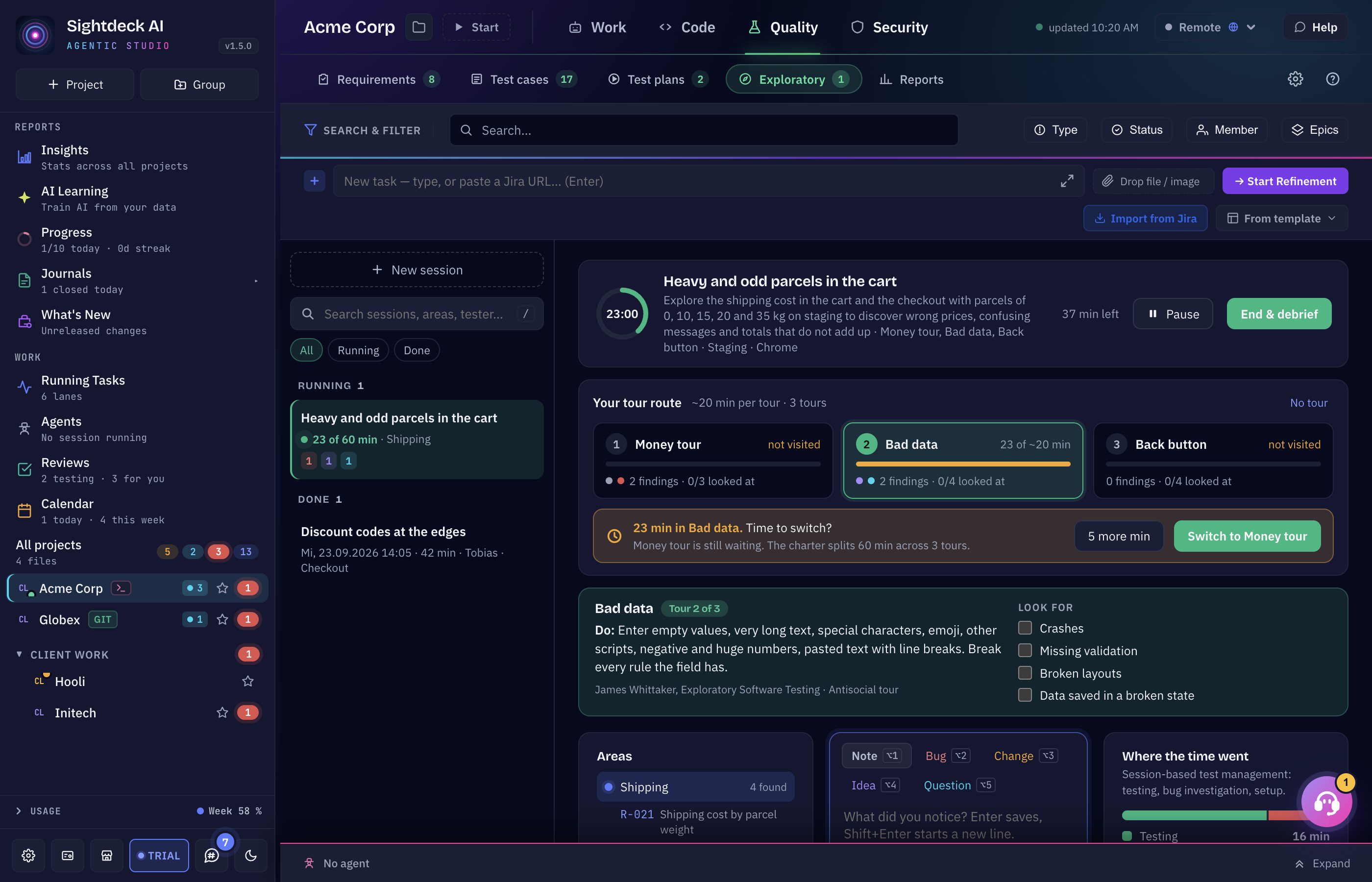
Example: guest checkout on staging
- New session "Guest checkout, first look", area Checkout, tester Tobias on staging with Chrome, time-box 60 minutes, tours Persona: first-time user and Interruptions.
- During the session: a bug ("Reload on the payment page empties the guest's address"), an idea ("Offer to create an account after the order") and a question ("Do guests get an order confirmation e-mail?").
- In the debrief the bug becomes a bug task, the idea becomes a new requirement next to R-017, and the question goes to the Team Chat.
Related
- Requirements: the folders sessions explore.
- Team Chat: where questions go.
- Quality overview.