
What you get
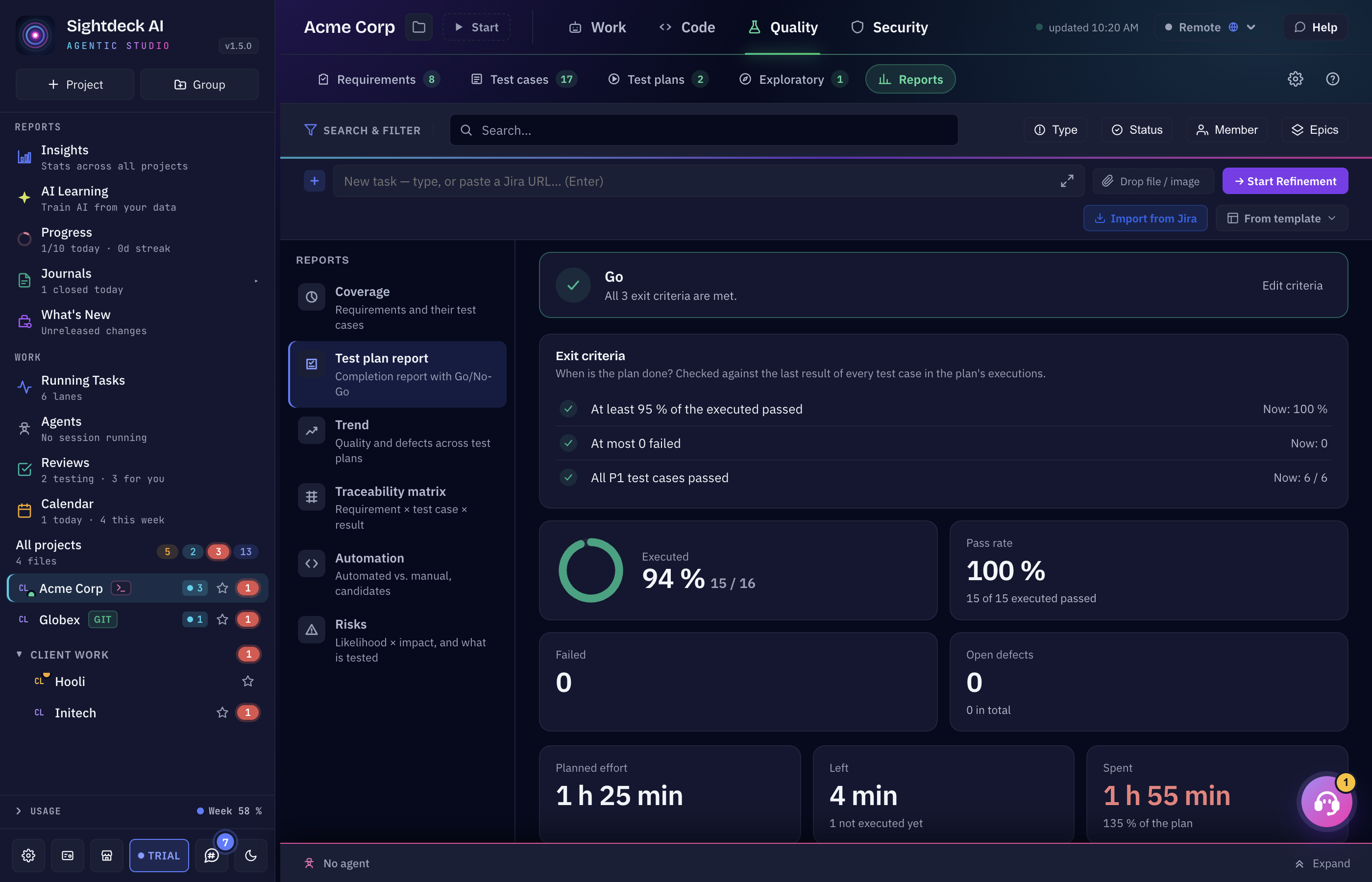
Open the Reports tab and pick a report on the left:
- Coverage: requirements and their test cases.
- Test plan report: a completion report with Go / No-Go.
- Trend: quality and defects across test plans.
- Traceability matrix: requirement × test case × result.
- Automation: automated versus manual, and what to automate next.
- Risks: likelihood × impact, and what is tested.
Coverage
How many requirements are covered by how many test cases, and how those test cases came out last. You see the share of requirements covered, test conditions covered, requirements without a test case (and how many of them are P1), covered and passed, and a chart of requirements by number of test cases. By folder splits it per folder.
Gaps lists what needs work, sorted by priority: Without test case, With failure, Never executed and Open conditions. Create test case right there creates a linked one. Sightdeck shows the gap; you decide whether to close it.
Test plan report
Pick a plan to see what ran, how it came out and whether the exit criteria are met: the verdict, each criterion with its current value, executed and pass rate, open defects, effort (planned, left, spent), a burndown towards the due date, every run of the plan, the requirements it covers, the test cases not passed yet, the defects filed from it, and results per configuration. You also open it from a plan with Test plan report.
Trend
How pass rate, execution and defects develop from plan to plan, oldest first. It compares defects found in testing with escaped defects found after the release, and gives the defect detection percentage (DDP) once you enter escaped defects in a plan. The charts start with the second plan.
Traceability matrix
Which test case covers which requirement, with its last result, as a grid. Narrow it with the filters when it gets large. Besides Copy as Markdown it offers Copy as CSV for a spreadsheet.
Automation
How much of the catalog runs by itself: the share of automated test cases, P1 automated, per top folder, per test type and priority, and which file automates which test cases. Worth automating next lists manual test cases that are executed often, matter most or take many steps. Flaky tests lists results that keep switching between passed and failed.
Risks
Risk-based testing in one view: a risk matrix with the number of requirements per likelihood and impact, the rated requirements with the highest risk first and their test state, and the count of high-risk requirements not passed yet. Covered and passed counts as safe.
Copy as Markdown
Every report has Copy as Markdown. It copies headings, key numbers and tables, ready to paste into a pull request, a release note, a ticket or the Team Chat.
Release sign-off
Sightdeck does not sign off a release on its own. It gives you the facts; a person decides. A release is ready when its test plan shows Go, and Go only comes from real results: the exit criteria are checked against the last result of every test case in the plan. Test cases that never ran do not count as passed.
Example: before shipping "Release 2.7", open the Test plan report. It shows Go: 100 % executed, every test case of TC-031 to TC-047 passed, no open defect, and the high-risk requirement R-021 passed. The Risks report shows no high-risk requirement left open. Copy the Test plan report as Markdown and paste it into the release ticket for the sign-off.
Related
- Test plans and runs: exit criteria and Go / No-Go.
- Requirements: rate the risk the reports use.
- Quality overview.