What it is
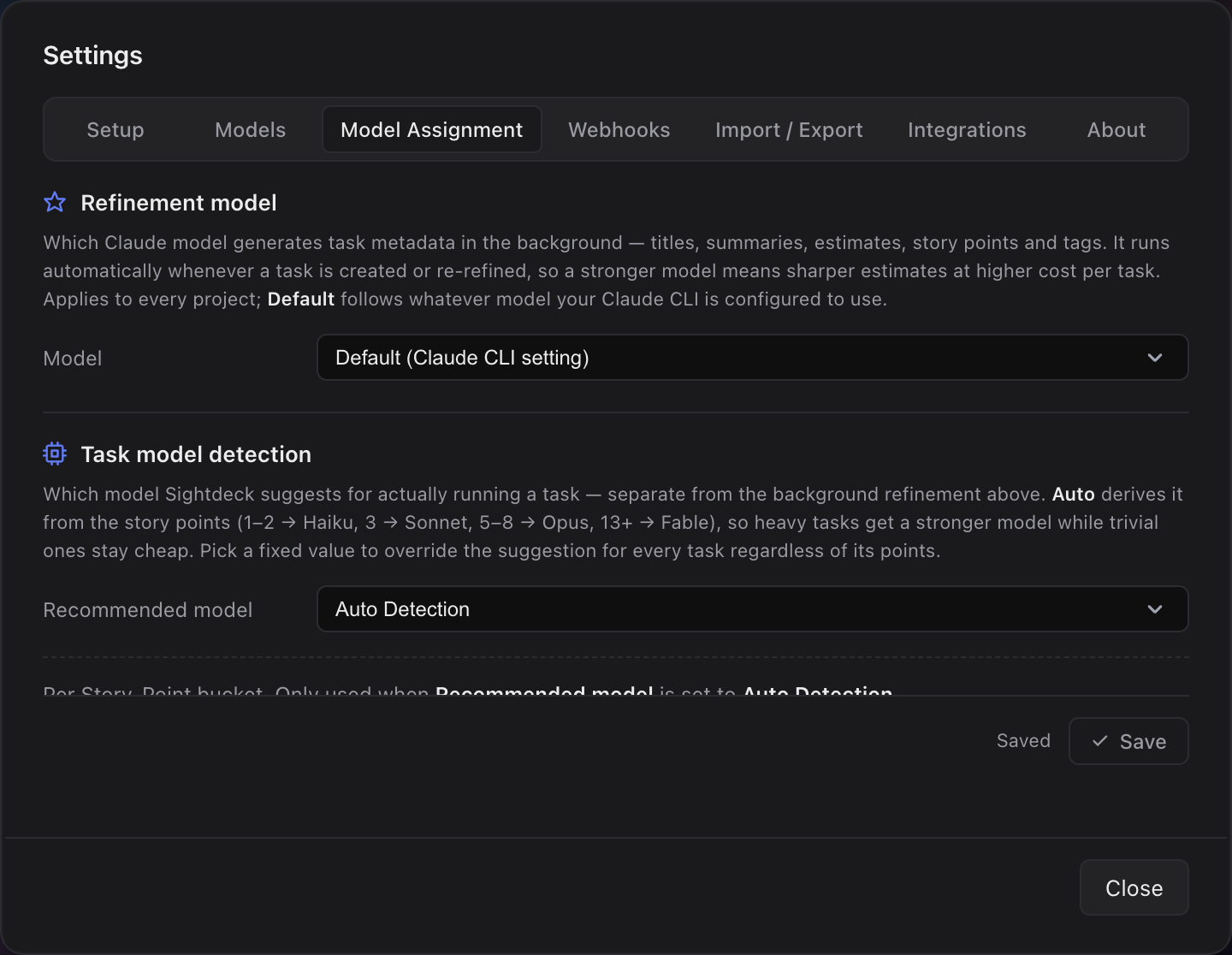
- Refinement model — which model generates task metadata (titles, summaries, estimates, story points, tags) when a task is created or re-refined.
- Recommended model — the model proposed for running a task. Defaults to Auto, which reads the Story-Point → Model map below. A fixed value overrides the auto-recommendation.
- Story-Point → Model map — per Fibonacci group (1, 3, 5, 8+) set which model "Auto" picks. The four groups collapse the full scale (1, 2, 3, 5, 8, 13, 21, 34) into the buckets you actually pick in practice — 8+ assigns the same model to 8, 13, 21 and 34.
- Design work — one global dropdown (None / Haiku / Sonnet / Opus / Fable). When refinement flags a task as graphical UI/layout work, the higher of the story-points model and the design model wins. "None" disables the override.
How the suggestion works
The suggested model follows the task's story points — its complexity estimate. Trivial work gets a fast, cheap model; small tasks a balanced one; medium-to-large tasks a strong model; and the rare huge, ambiguous task the top tier.
- Trivial (typos, one-liners) → a cheap, fast model.
- Small → a balanced model.
- Medium to large (refactors, multi-file work) → a strong model.
- Huge or unclear scope → the top-tier model.
What you get
- Sharp estimates without paying Opus prices on every refinement: pick a strong model for the few refinement calls, leave the per-task runtime to Auto.
- You spend the right amount per task — no overpaying for small work, no under-powering a hard one.
- The default is automatic. No thinking required unless you want to override.
- Predictable cost: when Auto is fine for most teams, you don't have to think about it.
- One global place to dial cost vs. quality — no per-project surgery.
- Bulk runs with mixed models warn you, so you don't accidentally drop a hard task to the cheapest model.
How you use it
- Open Settings → Refinement.
- Under Refinement model, pick Default / Haiku / Sonnet / Opus / Fable. As a rough guide, Haiku is fastest and cheapest, Opus the most capable, and Fable the top tier; "Default" follows your Claude CLI configuration.
- Under Recommended model, pick Auto Detection (recommended) or fix a specific model.
- Optional: in the per-Story-Point bucket panel below, adjust the model per bucket (e.g. promote 3 pts to Opus, or drop 5 pts to Sonnet). The panel only applies when Recommended model is Auto Detection.
- Optional: under Design work, pick the model for graphical UI/layout tasks. Refinement decides per task whether it is design work; if so, the design model competes with the story-points model and the higher one wins.
- Save. The next refinement and the next task start use the new choice.
- After refinement, open a task — the model picker in the detail panel shows the suggested model.
- Override it if you know better ("small but fiddly — give it the stronger one").
- Start the task; your choice is used. For a bulk run with mixed models, the app warns you and proposes the strongest of the selected models.