
What you get
- You see at a glance what is running, what is testing, what is waiting.
- No switching between terminal windows or chats to check status.
- Bottlenecks pop immediately: too many actives, a blocked run, an agent stuck in testing for hours.
- Parallel runs show up as lanes side by side. Serial chains as tiles connected by
→. The structure is visible without thinking.
How you use it
- Open the app, top left click Running Tasks.
- Each active lane shows: project, task title, status pill (
active/testing/feedback_required), run duration. - Click a tile to open the detail panel with concept and history.
- As soon as a task is done, it disappears from Running Tasks and lands in the project's done list.
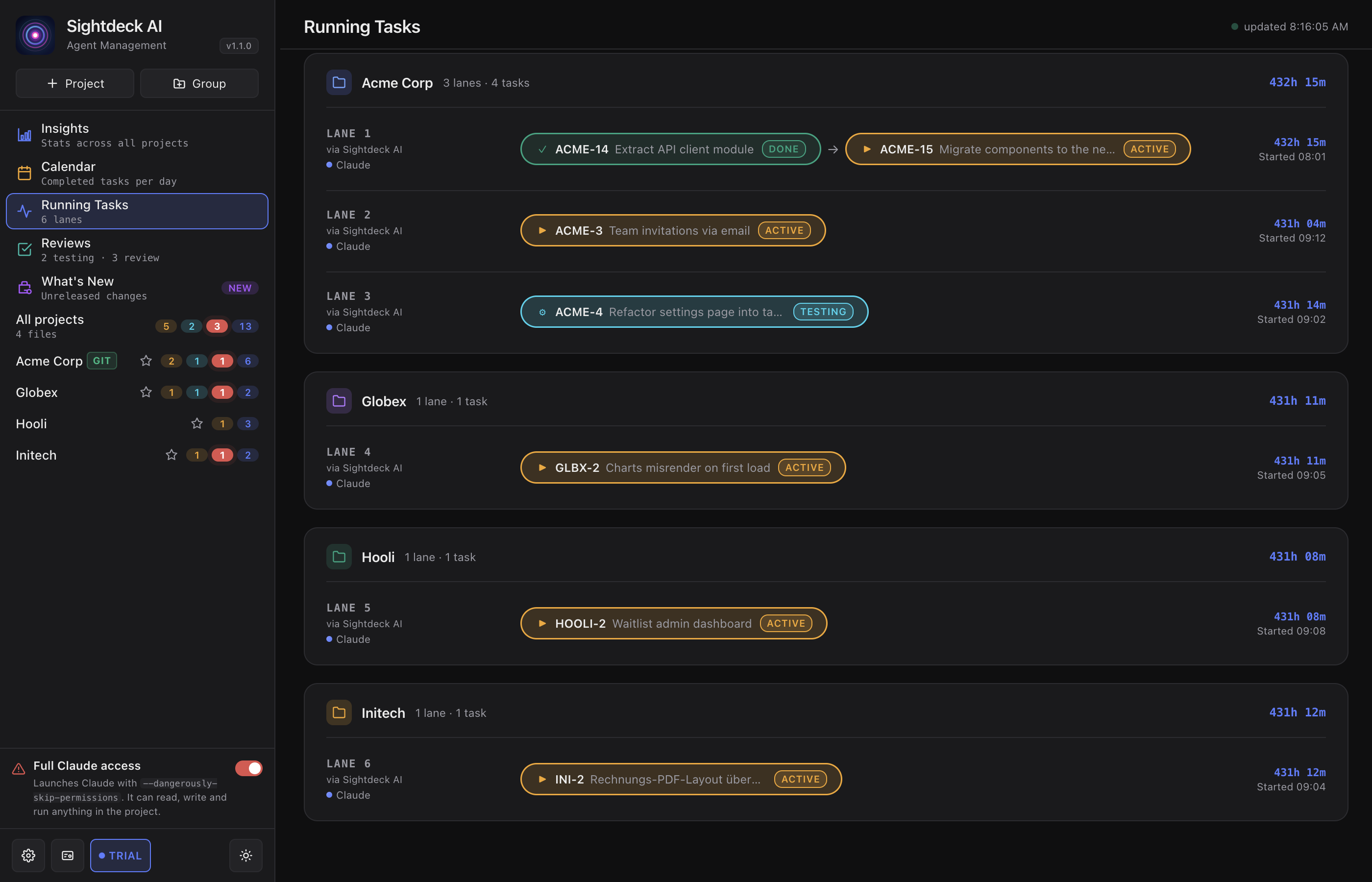
Parallel and serial runs
The lane layout tells you how a run is structured at a glance. Several tasks started together as a parallel run appear as separate lanes side by side, each working on its own. A serial chain — one task after another — shows as tiles in a single lane joined by →; when one tile reaches done, the next starts on its own.
A lane stays on screen while any of its tiles is still active, testing or feedback_required. Once every tile is done, the whole lane clears itself.